

Most traders assume TradingView executes their strategies automatically once an alert fires. That assumption is wrong, and it costs traders real money when they discover the gap between signal and execution. What is TradingView automation, exactly? It is the process of connecting TradingView’s alert system to an external execution platform via webhooks, which then places live trades through a broker API on your behalf. This guide breaks down how that technical chain works, which tools bridge the gap best, how to set up the workflow safely, and what pitfalls to avoid before you go live.
Table of Contents
Key Takeaways
| Point | Details |
|---|---|
| TradingView does not trade | It generates alerts and signals only; an external platform executes your actual orders. |
| Webhooks are the link | Paid TradingView plans send JSON payloads via HTTP POST to your automation platform. |
| Tool choice matters | Match your platform to your broker, asset class, and strategy complexity. |
| Security is non-negotiable | Restrict API key permissions, enable 2FA, and whitelist IPs before going live. |
| Testing prevents losses | Paper trading and backtesting are required steps before any live capital is at risk. |
What TradingView automation is and how it works
TradingView is the charting and analysis gold standard for retail and professional traders alike. What it does not do is touch your brokerage account. TradingView sends alerts based on chart conditions but does not execute trades by itself. That distinction is the entire foundation of understanding TradingView automation.
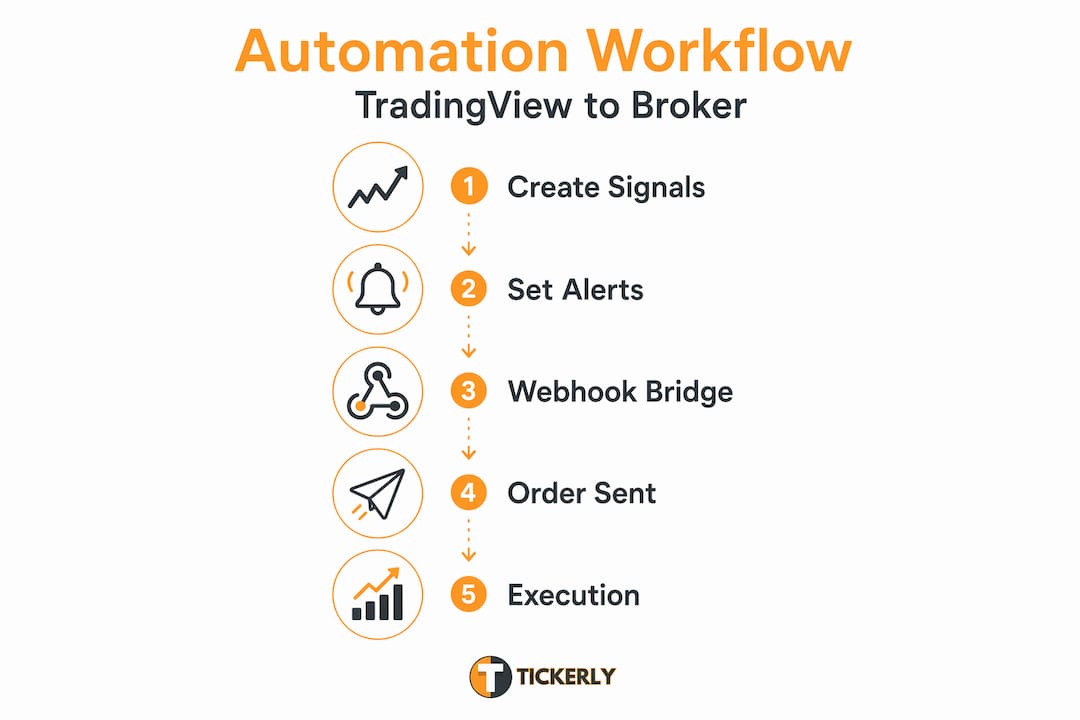
Here is how the technical chain actually works:
-
Pine Script strategy: You write or import a Pine Script strategy that defines entry and exit logic. When those conditions are met on a live chart, TradingView fires an alert.
-
Alert with webhook URL: The alert is configured to send an HTTP POST request to a webhook URL you specify. That request carries a JSON payload containing your trade instructions, such as symbol, direction, order size, and action type.
-
Automation bridge platform: The external platform receives the JSON payload, interprets it, and translates it into an order through your broker’s API. This is where the actual trade execution happens.
-
Broker API execution: The broker receives the order instruction, confirms it, and fills it in the market.
The automation bridge is the critical piece most beginners overlook. Combining AI signal generation with webhook execution creates the most reliable and sophisticated automated trading workflows available today. Without that bridge, your alerts stay as notifications and nothing more.
Pro Tip: Write your Pine Script alerts with clean, structured JSON from the start. Sloppy message formatting is one of the top reasons automation bridges fail to parse signals correctly.
Best TradingView automation tools in 2026
Choosing the right automation platform depends heavily on your broker relationships, asset classes, and technical comfort level. Here is a practical comparison of the leading options traders use today.
| Platform | Best For | Supported Assets | Ease of Use |
|---|---|---|---|
| Tickerly | TradingView-strategy first automation | Stocks, crypto, forex | High |
| TradersPost | Multi-broker webhook automation | Stocks, crypto, futures | Medium |
| 3Commas | Crypto bot customization | Crypto | Medium |
| WunderTrading | Copy trading and DCA bots | Crypto | High |
A few important distinctions to understand:
-
Tickerly connects directly to TradingView alerts and supports multiple brokers with a focus on giving complete control to your strategy script. It is designed specifically for traders who want automated trading on TradingView without writing complex code to make it actually trade.
-
TradersPost bridges TradingView alerts to brokers through webhook signals, supporting stocks, crypto, and futures across multiple brokers. It handles position sizing and risk management server-side.
-
3Commas and WunderTrading are more crypto-centric, with strong copy trading and dollar cost averaging bot features but limited support for equity or futures brokers.
When evaluating the best TradingView automation tools for your setup, consider three factors: which brokers are supported, whether prebuilt mini-bots are important to you, and how you want to handle advanced risk controls like position scaling or multi-level take profits. Most platforms operate on subscription tiers, ranging from free entry plans with limited bot capacity to professional plans with priority execution and more active strategies running simultaneously.
Pro Tip: Before committing to any platform subscription, verify that your specific broker is on the supported list. Many traders discover incompatibility only after paying for a plan.
Security and operational best practices
Automated trading introduces real financial risk if you cut corners on setup. The most common mistakes are not strategic. They are operational.
Security comes first. When you connect your broker account to an automation platform via API, follow the principle of least privilege. Disable withdrawal permissions on your API keys, enable two-factor authentication on every platform in the chain, and use IP whitelisting wherever the broker supports it. An exposed API key with full permissions is an open door to your capital.
Latency affects your returns more than you think. Network jitter impacts execution speed and slippage directly. Many professional traders run their automation software on a VPS located geographically close to their broker’s servers. Even a 50-millisecond reduction in latency can meaningfully improve fill prices on fast-moving strategies.
Never set and forget. This is the most expensive mindset in automated trading. Active monitoring of orders and errors is not optional. Brokers experience outages. Webhooks fail. Position sizes drift. Traders who walk away from a running bot without monitoring checks in place have discovered these problems only after significant losses.
Additional operational habits that protect you:
-
Run paper trading for at least two weeks before deploying live capital on any new strategy
-
Create alerts in your monitoring dashboard for any webhook that fails to return a successful response
-
Keep a manual override process documented and ready for broker-side outages
Pro Tip: Configure your automation platform to send you a notification for every executed order. Reviewing fills in real time catches configuration errors before they compound.
How to set up your TradingView automation workflow
Getting from a TradingView strategy to a live, automated trading bot involves six concrete steps. Follow them in sequence.
-
Create or import a Pine Script strategy. Your strategy must include "strategy.entry()
andstrategy.close()calls with defined alert conditions. If you are using an indicator instead of a strategy, define explicit alert conditions usingalertcondition()`. Test the logic thoroughly in TradingView’s strategy tester before touching alerts. -
Upgrade to a paid TradingView plan. Webhook functionality requires an Essential plan or higher. Free plans only deliver email notifications. This is a hard requirement, not a suggestion.
-
Set up your automation platform and generate a webhook URL. Register with your chosen platform, connect your broker via API, and copy the webhook endpoint URL that platform provides. This URL is where TradingView will send its JSON payloads.
-
Configure TradingView alerts with the webhook URL and JSON message. In the alert settings, paste the webhook URL and write the JSON message body. Your automation platform’s documentation will specify the exact format it expects.
-
Paper trade first, then iterate before going live. Run the full workflow in your platform’s paper trading mode. Confirm that every alert fires, every webhook delivers, and every order fills as expected. Only after consistent paper performance should you switch to a live account with minimal position sizes initially.
For a more detailed walkthrough of this process, the guide on how to automate trading on TradingView using Tickerly covers platform-specific configuration steps.
Future trends in TradingView automation
The automation space is moving fast in 2026, and several developments are changing what is possible for retail traders.
-
Low-latency cloud execution environments. Cloud-native VPS options with co-location near major exchange matching engines are now accessible to retail traders at reasonable monthly costs. This levels the playing field for execution speed.
-
Multi-exchange and copy trading growth. Platforms that route a single TradingView strategy across multiple exchanges simultaneously are gaining adoption, particularly in crypto where liquidity fragmentation creates arbitrage-adjacent opportunities.
-
Alternative data integration. Sentiment feeds, macroeconomic event triggers, and news-based signals are being piped into TradingView as custom indicators, expanding what can trigger an alert beyond pure technical conditions.
-
Ongoing monitoring as a competitive edge. Persistent strategy monitoring and parameter adjustment remain critical as market regimes shift. Traders who treat their bots as dynamic systems rather than static programs consistently outperform those who do not.
My take on what automation actually demands
I have watched traders approach TradingView automated strategies with one of two attitudes: they either want to automate everything and disappear, or they are so cautious they never go live at all. Both approaches produce poor results.
In my experience, the traders who do well with automation treat it as a continuous operation, not a one-time setup. I have seen strategies that looked perfect in backtesting fall apart within two weeks of live deployment because market microstructure changed. That does not mean the strategy was bad. It means monitoring and iteration are part of the job, not optional add-ons.
What I have found actually works is building the simplest possible automation first. One strategy, one broker, one asset. Get the full webhook chain functioning cleanly, confirm fills match expectations, and then expand. The traders who try to automate a dozen strategies across five brokers simultaneously on day one create complexity they cannot troubleshoot when something breaks, and something always breaks initially.
The combination of AI-assisted signal generation with reliable bridges is genuinely exciting, but I would caution against trusting an AI-generated strategy you do not understand. If you cannot explain why a trade was taken, you cannot manage the risk when conditions change. Automation amplifies your strategy, good or bad. Start with what you already understand, then build up.
— Janus
Automate your TradingView strategies with Tickerly
Tickerly turns your TradingView strategies into fully automated trading bots without requiring you to write backend code or manage server infrastructure. The platform connects directly to TradingView alerts via webhooks, interprets your JSON signals, and executes orders through your broker API with speed and precision.
Whether you trade stocks, forex, or crypto, Tickerly supports multiple brokers and asset classes with built-in position sizing, risk controls, and order monitoring. You can start with a demo account to validate your full automation chain before risking live capital. If you are ready to stop managing trades manually and put your strategies to work around the clock, explore why automated bots improve results and visit Tickerly to get started today.
FAQ
Does TradingView execute trades automatically?
No. TradingView generates alerts based on chart conditions but does not place orders in your brokerage account. An external automation platform connected via webhook handles actual trade execution.
What TradingView plan do you need for automation?
You need at least an Essential paid plan. Free TradingView accounts only support email alerts, and webhook functionality requires a paid subscription tier.
What is a webhook in TradingView automation?
A webhook is an HTTP POST request that TradingView sends to a specified URL when an alert fires. It carries a JSON payload with your trade instructions, which the automation platform reads and acts on.
How do TradingView bots handle order types?
Most automation platforms map TradingView alert signals into market, limit, stop, and stop-limit orders. Advanced platforms also support trailing stops and multi-level take profits for more precise risk management.
Is automated trading with TradingView safe?
It can be, provided you follow security best practices including restricted API key permissions, two-factor authentication, and IP whitelisting, combined with active monitoring and paper trading before live deployment.