

For most TradingView traders, the best low latency bots run through a managed relay or a direct broker webhook, not a co-located server. Reserve co-location or custom stacks for strategies where backtests prove the edge collapses above roughly 50 milliseconds. Instrument your latency first, run a short paper-live check at multiple delay settings, and let the data (not the marketing) decide your infrastructure. Tickerly covers the relay side of that equation directly.
TL;DR:
Most retail traders find that relay or broker webhooks deliver sufficient low-latency execution, making co-location unnecessary unless your strategy’s edge collapses above 50 milliseconds.
Measuring each stage of the order lifecycle separately reveals critical bottlenecks, with retail setups typically reaching 80 to 180 milliseconds and co-located stacks achieving under 20 milliseconds.
Backtesting with variable latency and live timestamp logging help confirm whether speed improvements genuinely enhance strategy performance, especially when edge erosion occurs past 50 milliseconds.
Operational complexity and cost vary significantly: managed relay solutions are simple and predictable, while self-hosted or co-located systems require ongoing maintenance and higher expenses.
Prioritizing signal quality and realistic testing over speed obsession prevents unnecessary infrastructure spending and ensures infrastructure upgrades address proven bottlenecks.
Table of Contents
-
The Real Order Lifecycle: Four Latency Components You Must Measure
-
Realistic Retail Benchmarks: Relays, VPS, and Co-Location Compared
-
How to Choose the Right Low-Latency Bot for Your Trading Style
What “Low Latency” Actually Means for TradingView Bots
Latency, in this context, is the full round-trip: the moment your Pine Script condition triggers on a closed bar, through the webhook payload, across a relay or broker API, to a filled order confirmation. That entire loop is what determines whether your bot captures the price you modeled or something worse.
Not every strategy needs the same speed. A rule of thumb helps you avoid overspending on infrastructure your edge doesn’t require:
-
Scalping and latency arbitrage: needs sub-100ms, often sub-50ms, round-trip execution, because the price edge decays within a few ticks.
-
Intraday momentum or breakout strategies: tolerates 200 to 800 milliseconds comfortably, since the signal’s shelf life is measured in seconds or minutes.
-
Swing and position strategies: barely notices latency at all. A one or two-second delay changes almost nothing when your holding period is measured in days.
Retail-accessible automation tools generally land in the 20 to 500 millisecond band, while institutional high-frequency trading stacks with co-located FPGA hardware operate in the microsecond or single-digit millisecond range. Knowing which bracket your strategy actually needs is the first decision, and it’s the one most traders skip before buying hardware they don’t need.
The Real Order Lifecycle: Four Latency Components You Must Measure
Every execution delay breaks down into four measurable stages, and treating them as one lump number hides where your bottleneck actually lives.
-
Signal-to-send: the time your code takes to process the TradingView alert, serialize the JSON payload, and fire the outbound request. Language choice, CPU load, and unnecessary serialization overhead all add milliseconds here, and this is the one piece entirely under your control.
-
Network outbound: the trip from your hosting location to the broker or relay endpoint. Server region, hop count, and ISP routing all matter more than most traders assume.
-
Broker or venue matching: how fast the receiving side processes your order internally. An ECN with direct market access behaves nothing like a retail broker running an internal matching queue.
-
Confirmation round-trip: the return leg that tells your bot the fill happened, plus jitter, the variance between your fastest and slowest executions.
A retail VPS-to-broker setup commonly sums these four stages to roughly 80 to 180 milliseconds, while a co-located ECN deployment can compress the same components down to 5 to 20 milliseconds. That gap is why monitoring median, p95, and p99 latency matters more than watching your average: tail latency, not typical latency, is what wipes out a tight strategy during a volatile open.
Realistic Retail Benchmarks: Relays, VPS, and Co-Location Compared
The gap between marketing claims and measured performance is where most traders get burned, so here’s what each deployment tier actually delivers.
Managed relay and webhook chains typically measure 250 to 800 milliseconds from bar close to broker fill confirmation on US equities, with occasional excursions past 2 seconds when a broker API throttles or queues requests during high-volume windows. That’s fine for intraday and swing strategies. It will quietly kill a scalping strategy that assumed instant fills.
-
Generic VPS plus retail broker: 80 to 180 milliseconds typical, tight enough for most intraday systems but often too slow for latency-sensitive arbitrage signals.
-
Co-located ECN or bare-metal stacks: sub-20ms round-trips are achievable for venue-proximate deployments, at meaningfully higher cost and operational burden.
-
Long-tail events: broker queuing, API rate limits, and exchange-side congestion create spikes that don’t show up in your average latency but absolutely show up in your drawdown.
Upgrading to premium, institutional-grade data feeds and optimized processing frameworks can meaningfully cut effective latency by removing buffering that leaves your signal stale before it even fires. That upgrade is worth the cost only when your backtested edge genuinely depends on the milliseconds it buys back.
How to Measure and Backtest Execution Latency Correctly
Most retail backtests quietly assume instant fills, which is why live performance so often disappoints. Fixing that assumption is a five-step process:
-
Backtest with a configurable execution-time parameter. Use tick replay rather than bar-close approximation, and model the open leg and close leg separately since slippage rarely behaves symmetrically.
-
Test at multiple latency settings. Run the same strategy through 10ms, 50ms, and 150ms execution delays to see exactly where your edge starts to erode.
-
Timestamp everything live. Log the signal generation time and the fill confirmation time for every trade, then compute round-trip latency along with p95 and p99 outliers, not just the average.
-
Run synthetic order path tests. Send test payloads through your full pipeline during market hours without real capital at risk, to catch broker-side queuing before it costs you money.
-
Run a one-week paper-live check. Compare realized slippage against your backtest at each of the three latency configs, and use the divergence to decide whether you need a faster relay or a different broker entirely.
Pro Tip: Log latency at each of the four lifecycle stages separately, not just the total. A single aggregate number tells you something is wrong; component-level logs tell you what to actually fix.
Strategies that look profitable at 10ms but break even at 150ms are telling you something important: don’t spend on infrastructure until execution-aware backtesting confirms the spend will change your outcome.
Deployment Options and Trade Suitability
Three deployment categories cover almost every TradingView automation setup, and each trades operational simplicity against raw speed.
-
Managed relay: low operational overhead, moderate latency (roughly 250 to 800ms end-to-end), and someone else handles broker API maintenance and retry logic. This is the practical starting point for most retail algorithmic traders.
-
Self-hosted VPS or bare-metal: more control over the stack, latency in the 80 to 180ms range, but you own every API change, every retry policy, and every outage.
-
Co-location or custom stack: the lowest achievable latency, sub-20ms in venue-proximate setups, paired with the highest cost and the heaviest ongoing operational demand.
Whichever tier you pick, keep idempotency keys, retry logic, and risk controls local to the hot path. A risk guard that has to make a network call before blocking a bad order defeats the purpose of low latency. Decide based on three checkpoints: the round-trip your strategy actually requires, your budget for ongoing operations, and how much developer time you can realistically commit to keeping a self-hosted system alive. Most traders overestimate the first number and underestimate the third.
Recommended TradingView Setup: Where Tickerly Fits
A practical, three-step implementation covers nearly every TradingView-to-broker use case:
-
Set up your TradingView alerts with well-formed JSON payloads. Include symbol, side, quantity, and a unique order identifier in every alert so downstream systems can deduplicate reliably.
-
Choose a managed low-latency relay or a direct broker webhook based on your measured latency need. Most intraday and swing strategies never need to go further than this step.
-
Instrument latency immediately and run staged paper trades before committing real capital, using the 10/50/150ms backtest comparison from the measurement checklist above.
Tickerly handles the automation layer of this workflow directly: it converts TradingView strategy alerts into live orders across supported crypto, forex, and stock exchanges, with execution-speed-focused relay infrastructure built for exactly this job.
Pro Tip: Keep logging off the hot path. Write execution logs asynchronously after the order fires, never before, so a slow disk write never becomes the bottleneck in your signal-to-send time.
Idempotency keys on every payload prevent duplicate fills when a webhook retries after a timeout, and a colocated pre-trade sanity check catches malformed orders before they ever reach the broker.
Popular TradingView-Compatible Bots and Platforms, Compared
The TradingView automation category splits into a few recognizable types, each with a different latency profile and a different failure mode.
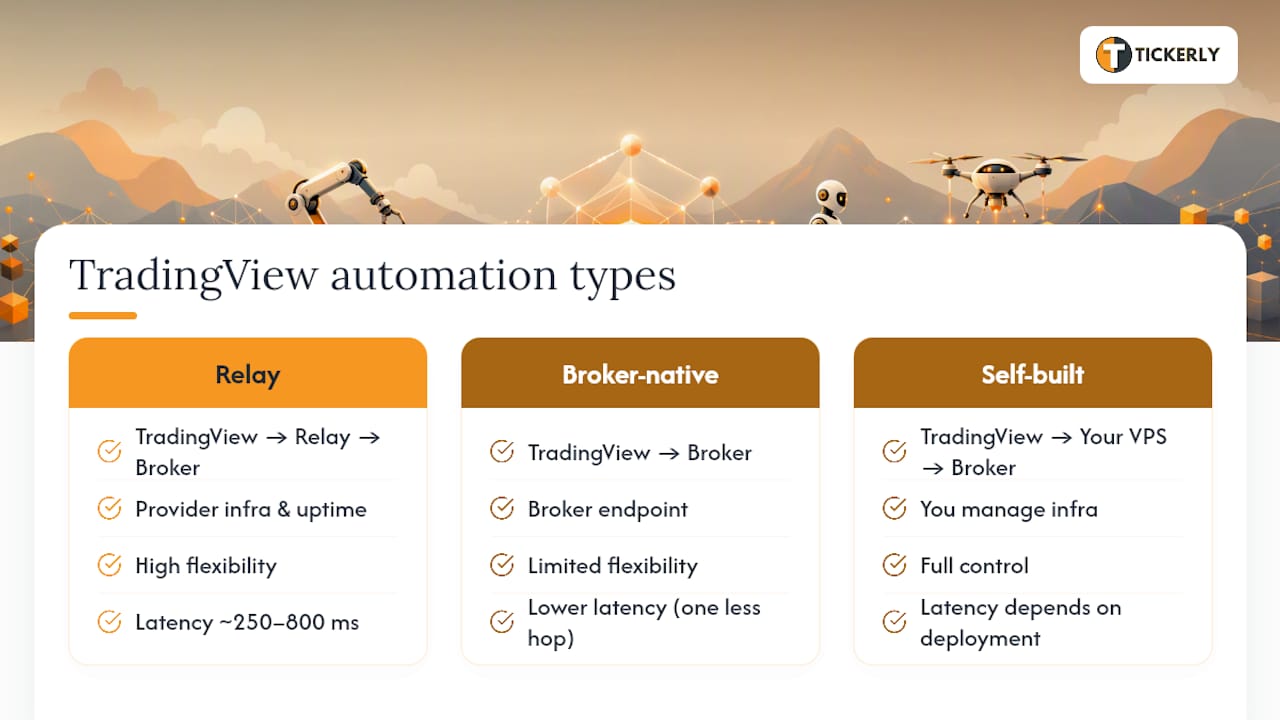
Webhook-to-broker relay services sit between TradingView and your broker’s API, translating alerts into orders while handling authentication and retry logic for you. Their strength is low operational burden. Their weakness is that you’re dependent on the relay provider’s own infrastructure and uptime, and latency sits in the 250 to 800ms range for most of these services.
Broker-native webhook endpoints, where the broker itself accepts TradingView alerts without an intermediary, cut out one network hop and one point of failure. The tradeoff is flexibility: you’re limited to whatever order types and asset classes that specific broker supports, and switching brokers later means rebuilding your integration.
Self-built webhook receivers, typically a small server running on a VPS that parses TradingView payloads and calls broker APIs directly, give you full control over payload structure, retry behavior, and logging. They also make you responsible for every broker API change, every outage, and every edge case in order handling.
MetaTrader-bridged automation, which routes TradingView signals into MT4/MT5 environments, matters for forex traders who want to keep using MetaTrader’s execution and risk tools while sourcing signals from Pine Script. Latency here depends heavily on the bridge implementation and tends to run comparable to standard relay chains.
None of these categories eliminates the need to measure your own round-trip latency in your own deployment. Published averages describe typical conditions, not your specific broker, region, and network path.
How to Choose the Right Low-Latency Bot for Your Trading Style
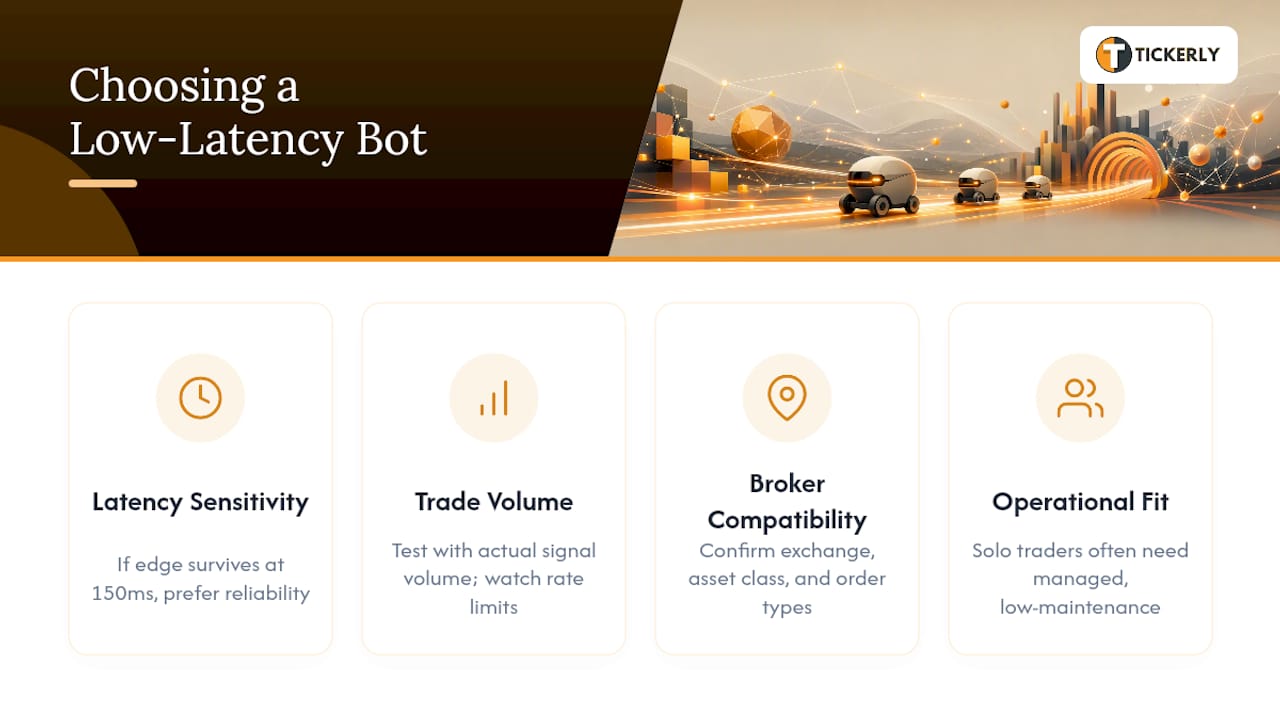
Trading style should drive this decision more than any spec sheet. A scalper evaluating relay options needs to ask a different set of questions than a swing trader automating a weekly rebalance.
Start with your strategy’s latency sensitivity, which you should already know from backtesting at multiple delay settings. If your edge survives comfortably at 150ms, you don’t need to shop for anything faster; you need reliability and clean broker integration instead. If your edge starts eroding past 50ms, latency becomes the primary selection criterion, and you should be testing actual round-trip numbers with each candidate before committing.
Trade volume matters too. A bot or relay that handles occasional signals gracefully might buckle under a strategy that fires dozens of alerts per minute across multiple symbols, since API rate limits and payload queuing become real constraints at that frequency. Check whether the service publishes rate limits or throttling behavior, and test against your actual signal volume during a paper run, not just a single sample alert.
Broker compatibility is the practical filter that eliminates most options fast. Confirm the platform supports your specific exchange or broker, your asset class (crypto, forex, stocks, or futures), and your order types before evaluating anything else. A platform with excellent latency numbers is worthless if it doesn’t connect to the broker you actually use.
Finally, weigh operational fit against your own resources. A solo trader with a day job needs a managed solution with low maintenance overhead far more than they need the last 20 milliseconds of speed.
What Low-Latency Bots Actually Cost
Pricing in this category generally follows one of three models, and understanding which one you’re paying for prevents surprise bills later.
Subscription SaaS pricing charges a monthly or annual fee tied to the number of strategies, alert volume, or connected exchanges you use. This model suits most retail traders because costs stay predictable regardless of how markets move, and tiers typically scale from a handful of strategies up to unlimited alerts for active multi-asset traders.
Per-trade or volume-based pricing charges based on execution count or notional volume processed. This can work out cheaper for very low-frequency traders but becomes expensive fast for anyone running multiple strategies or high alert volumes, since costs scale directly with activity.
Infrastructure-based costs apply to self-hosted and co-located setups, where you’re paying for server rental, co-location fees, and bandwidth rather than a software subscription. These costs are typically higher in absolute terms but decoupled from trading activity, and they carry ongoing maintenance costs that a subscription model absorbs for you.
The real cost comparison isn’t just the sticker price. It’s the sticker price plus your own time spent on broker API maintenance, retry logic debugging, and infrastructure monitoring. A relay subscription that costs more per month than a bare-metal server often costs less overall once you account for the engineering hours self-hosting demands.
When to Stop Chasing Speed and Focus on Signal Quality
Most latency obsession in retail trading is misdirected. If your backtest shows a strategy performing nearly identically at 10ms and 150ms, spending on co-location solves a problem you don’t have. The question worth asking before any infrastructure purchase is simple: does my edge actually decay at the timescale I’m trying to buy back?
For smaller trading operations, the better sequence is signal quality first, monitoring second, and hosting spend last. Improve your entry logic, tighten your risk controls, and instrument your own latency honestly before assuming faster infrastructure is the missing piece. Once your p95 and p99 numbers reveal a genuine bottleneck that’s costing measurable PnL, that’s the moment to justify a relay upgrade or a co-located deployment. Buying speed before you’ve proven you need it is how traders spend real money solving an imaginary problem.
— Jay
Get Started With Tickerly: Trial, Setup, and Next Steps
A trading automation service can provide a faster path than piecing together a relay yourself. It converts Pine Script alerts into live, execution-speed-focused orders across various exchanges, without requiring you to write or maintain broker API integration code.

You don’t need to guess whether it fits your strategy. Run a paper trial, connect your existing TradingView alerts, and watch how the fill latency compares to what you’re measuring now. If you’re still deciding whether automation makes sense at all, the automated bots overview walks through the practical tradeoffs. If you’re ready to move from alert to live order, the TradingView strategy automation guide is the direct next step, with a 30-day free trial to test the full setup before you commit to a subscription.
Sources
-
The Microsecond Economy: Latency, Speed, and the Future of FinTech-Driven Trading
-
How to automate TradingView alerts to a broker — 2026 playbook
-
Optimizing Automated Trading Execution Latency in Live Markets | Algovantis
-
The Hidden Cost of Millisecond Delays in Automated Trading – SPARK TIME
FAQ
What Counts as Low Latency for a TradingView Bot?
For most retail strategies, 250 to 800 milliseconds end-to-end is acceptable for intraday and swing trading; scalping or arbitrage strategies typically need sub-100ms, and sometimes sub-50ms, round-trip execution.
Do I Need Co-Location for TradingView Automation?
Only if your execution-aware backtest shows your strategy’s edge collapses above roughly 50 milliseconds; most TradingView users get acceptable results from a managed relay or direct broker webhook.
How Do I Measure Real Trading Latency?
Timestamp your signal generation and fill confirmation for every trade, then calculate the round-trip time along with p95 and p99 outliers, since tail latency drives most real-world losses.
Can Tickerly Handle Low-Latency TradingView Automation?
Yes. Tickerly converts TradingView strategy alerts into live orders across supported exchanges with execution-speed-focused relay infrastructure, and supports multiple asset classes and unlimited strategies on paid plans.
Why Do My Backtest Results Not Match Live Trading?
Most backtests assume instant fills, while live execution always carries real network, broker, and confirmation delays; testing your strategy at multiple simulated latency settings (10ms, 50ms, 150ms) closes most of that gap.
Recommended
-
30 Day Trial: TradingView Bots for Active Traders, No Coding Needed
-
How to Build a Step-by-Step Trading Bot on TradingView with Tickerly: A Complete Guide
This article was produced with Al assistance and reviewed for accuracy. It is provided for general information only and is not professional or financial advice.