

TL;DR: You can now plug any TradingView strategy straight into Aster, the next‑gen decentralized perpetuals exchange—fully automated via Tickerly to build an Aster Trading Bot. That means non‑custodial trading, MEV‑resistant execution in Simple Mode, Pro order book tools, and even stock perpetuals—while keeping your collateral productive with yield‑bearing assets. Set it up in minutes; trade 24/7.
Start free: Create your Tickerly account and connect Aster in a few clicks → Sign up for Tickerly.
Why set up an Aster Trading Bot with Tickerly?
Aster is a decentralized perpetuals exchange that supports:
- Market-order execution via Simple Mode—ideal for breakout and momentum strategies.
- Stock perpetuals like AAPL, TSLA, and more—trade beyond crypto.
- Yield-bearing collateral—your margin earns while you trade.
- Multichain support—BNB Chain, Ethereum, Arbitrum, and others.
Tickerly is the automation layer that connects your TradingView alerts to Aster with:
- Webhook-based execution—no VPS or custom server needed.
- Market-entry alert support—perfect for strategies that trigger on breakouts or trend shifts.
- Multi-TP, SL, trailing stop, and SL-to-BE logic—all handled in your strategy script.
- Cloud-based reliability—your bots run 24/7, even if your browser is closed.
What you’ll need
- A Tickerly account (free trial available)
- A TradingView strategy that uses market entries
- A wallet connected to Aster
- A few minutes to set up your webhook
Step-by-Step: Building Your Aster Trading Bot with Tickerly
Let’s get your automated strategy running!
Step 1: Set Up Your Tickerly Account
- If you’re new, Register for a Tickerly account. Choose a plan that fits your needs.
- If you’re already a user, log in to your dashboard.
Step 2: Connect Tickerly to Your Aster Account
- Log in to Aster and navigate to the API section.
- Create new API keys specifically for Tickerly.
- In your Tickerly dashboard, go to the ‘Add Exchanges’
- Select ‘Aster spot’ or ‘Aster Futures’, enter your Key and Secret from your API, and save the connection.
Step 3: Prepare Your TradingView Strategy & Alerts
- Have your Pine Script strategy ready on TradingView.
- In the ‘Message’ box of the TradingView alert, you’ll paste the specific Tickerly command syntax. You just copy the standard alert message from your “exchanges” list. This tells Tickerly exactly what action to take on Aster (e.g., which pair, order size, order type).
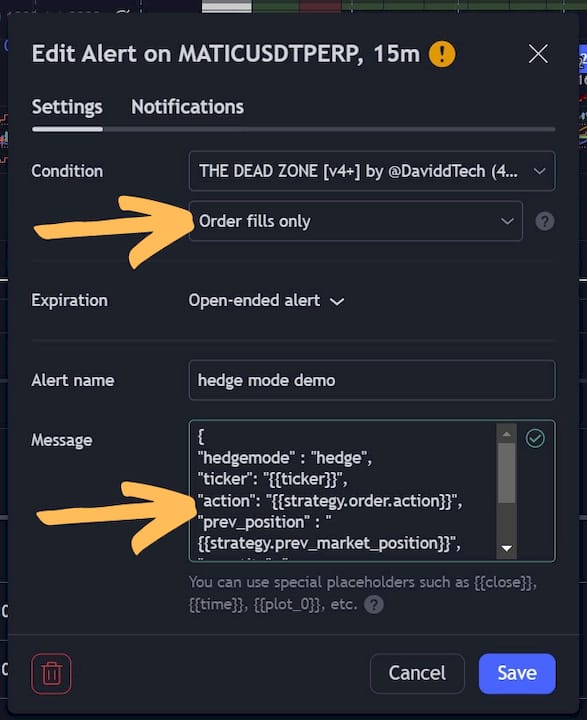
- In the ‘Alert Actions’ section of your TradingView alert setup, you’ll need to use the Tickerly Webhook URL provided in your Tickerly dashboard.

Step 4: Test Your Setup (Recommended)
- Before trading live capital, use Tickerly’s ‘Manual Alert’ feature (if available) or trade with a very small size.
- Trigger a manual alert from TradingView or wait for a signal.
- Verify in Tickerly and on Aster that the order was received and executed correctly. This ensures your webhook and command syntax are perfect.
Step 5: Activate and Monitor
- Once you’re confident in the setup, enable your alerts on TradingView.
- Tickerly will now listen for those signals and execute them automatically on Aster.
- Regularly monitor your bot’s performance through Tickerly and your Aster account. Fine-tune your TradingView strategy as needed based on results.
Ready to trade with your Aster Trading Bot?
- Create your Tickerly account → connect Aster → paste your Standard Alert into TradingView → go live.
- Try it here: Start your free trial on Tickerly.