

Cryptohopper is a cloud-based crypto bot with its own strategy designer, a marketplace and a tiered subscription. It suits traders who want to configure a bot inside one platform. If your strategy already lives in TradingView as a Pine Script strategy or indicator, the better question is different: do you want to rebuild that logic somewhere else, or send your existing alerts straight to your exchange? Tickerly is built for the second path. It turns TradingView alerts into live orders across crypto, forex, stocks, futures and prop firm markets, with a 30-day free trial.
This review covers how the two approaches differ, what each costs, and how to decide in about ten minutes.
Key Takeaways
- Cryptohopper is a crypto-focused bot platform where you configure strategies inside its own interface. Its published plans have started at $29, $69 and $129 per month.
- If your edge is a TradingView strategy, an alert-to-order bridge keeps your logic where you built it and avoids rebuilding it elsewhere.
- Tickerly plans are $19 (Level 2), $29 (Level 3) and $39 (Level 4) per month, after a 30-day free trial, and cover crypto, forex, stocks, futures and prop firm markets.
- Tickerly runs in the cloud, needs no VPS and no coding, and executes alerts within a fraction of a second. MetaTrader users still run their own MetaTrader terminal.
- Whichever tool you use, automation does not remove market risk. Your strategy’s rules decide your results, not the bot.
Table of Contents
- What Cryptohopper Is
- Cryptohopper Pricing at a Glance
- Two Different Jobs: A Bot Platform vs. an Alert Bridge
- Speed: Why It Matters for Alert-Driven Trading
- Exchanges and Markets
- Setup: What You Actually Do
- Is Cryptohopper Worth It?
- Cryptohopper vs. Tickerly: Side by Side
- Other Bots You Will See in Reviews
- Our Point of View
- Try Your Own Strategy on Tickerly
- FAQ
- Sources
What Cryptohopper Is
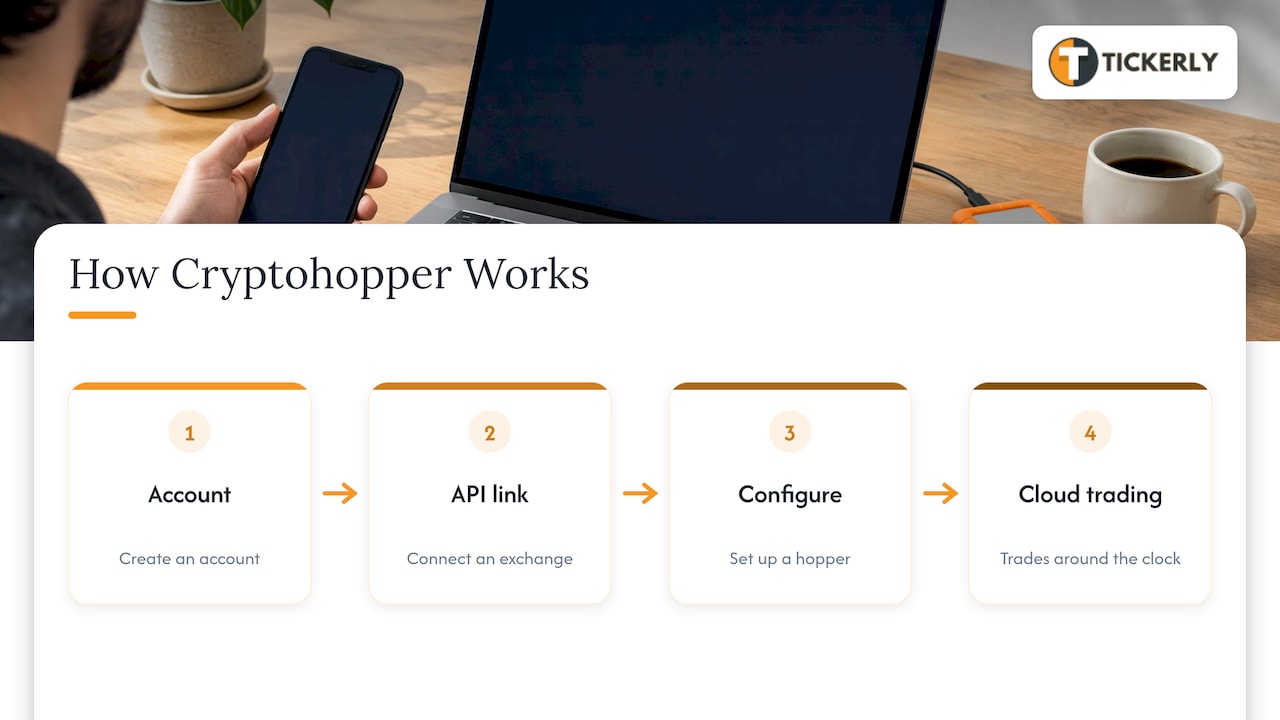
Cryptohopper launched in 2017 as a hosted crypto trading bot. You create an account, link an exchange through an API key, and configure a “hopper” that trades on your behalf around the clock. Because it runs in the cloud, you do not keep a computer switched on.
The platform centers on a few things: a visual strategy designer for building rules from technical indicators, a marketplace where users can browse strategies and templates, and a tiered subscription based on how many coins the bot can handle. Its focus is crypto spot trading across a list of supported exchanges.
That makes it a self-contained environment. You build, configure and run everything inside it. For a trader who has never written a strategy, that is attractive. For a trader who has spent months refining a Pine Script strategy on TradingView, it means a second place to maintain the same logic, and no guarantee the two behave identically.
Cryptohopper Pricing at a Glance
Cryptohopper’s published monthly plans have been Explorer at $29, Adventurer at $69 and Hero at $129, with discounts for annual billing. Plan limits are tied mainly to the number of coins the bot can trade, and higher tiers add features. Marketplace strategies and signals can carry separate costs on top. Check its pricing page for the current numbers, since plans change.
Tickerly’s pricing is built around a different question: which asset classes, how many strategies and how many alerts you need.
| Plan | Price | Typical fit |
|---|---|---|
| Tickerly Level 2 | $19 per month | Crypto exchanges, 20 active strategies, 100 alerts a day |
| Tickerly Level 3 | $29 per month | Adds Oanda, Capital.com and Alpaca; unlimited strategies, 1,000 alerts a day |
| Tickerly Level 4 | $39 per month | Adds MetaTrader 4/5 (up to 10 terminals, any broker or prop firm); 1,000 alerts a day |
| Tickerly Level 4 Ultra | See the plans page | 2,500 alerts a day |
Every plan starts with a 30-day free trial, and you can compare the exact limits on the plans page before you commit.
Two Different Jobs: A Bot Platform vs. an Alert Bridge
Most Cryptohopper reviews compare features. The more useful comparison is workflow, because the two tools sit at different points in a trader’s process.
Cryptohopper’s workflow: you design or pick a strategy inside Cryptohopper, connect an exchange, and the platform generates and executes the trades.
Tickerly’s workflow: you build the strategy in TradingView, where you already chart, test and refine it. TradingView fires an alert when conditions are met. Tickerly receives it and places the order on your connected exchange or broker. Position sizing, stops and risk rules stay in your TradingView strategy, where you control them.
The second workflow has three practical consequences.
- One source of truth. The logic you watch on the chart is the logic that trades. You are not translating it into another tool’s rule format.
- Pine Script stays useful. If you or a developer you work with writes Pine Script, that work goes directly into production.
- More than crypto. The same alert approach covers forex, stocks and futures, so one setup can serve several markets. Tickerly also supports MetaTrader 4 and 5 for forex traders.
If you want a deeper walkthrough of this flow, our guide to TradingView strategy automation takes you from alert to live order step by step.
Speed: Why It Matters for Alert-Driven Trading
When a TradingView alert fires, the price you wanted is already moving. The gap between the alert and the filled order is where slippage (the difference between the expected price and the executed price) comes from. For day traders working short timeframes, that gap is the number to watch.
Tickerly is designed for execution within a fraction of a second from alert to order. For direct exchange connections it runs in the cloud, so there is no VPS to rent, patch or reboot, and no webhook server to maintain. We explain how orders travel from signal to fill in real-time trade execution, and how to measure your own round trip in our low-latency TradingView bot guide.
Speed is not everything. A fast order from a poor strategy is still a poor trade. But if your strategy depends on entering near the signal price, execution speed is part of the strategy’s design.
Exchanges and Markets
Cryptohopper supports a list of crypto exchanges and focuses on crypto assets. If you only trade spot crypto, that coverage may be all you need.
Tickerly connects to exchanges and brokers through their APIs, and to MetaTrader through a connector in your own terminal, and spans more asset classes: crypto, forex, stocks, futures and prop firm accounts. You can see the supported list on our automated trading exchanges page, and the documentation overview shows setup per platform. Always check the list before you plan around a specific exchange, since support is exchange by exchange.
For MetaTrader, your own MetaTrader 4 or 5 terminal has to be running, so plan for that machine staying online. For everything else, the cloud handles execution without a server on your side.
Setup: What You Actually Do
Here is the Tickerly setup in plain steps, with where people usually trip.
- Create your strategy or indicator alert in TradingView. This is where your entry and exit rules, sizing and stops live. Most errors start here, when a strategy’s order logic is vague. Tickerly takes the work of turning the alert into an order off your hands.
- Create an exchange API key. Give it only the permissions trading requires. Never enable withdrawals on a key a bot uses. The partner guide to execution risk covers the risks to consider before you connect an account to any automated platform.
- Connect the exchange in Tickerly. You paste the key once. No code, no server.
- Test on the exchange’s demo account. Where an exchange offers a demo or testnet, run your alerts there first and confirm that orders arrive as intended.
- Set the alert message in TradingView. Our full trade alerts and advanced alert messages pages show the supported formats, so you use the real fields and nothing else.
- Go live with small size. Watch the first fills against your chart and scale only after the behavior matches your expectations.
The full tutorial is in how to automate trading on TradingView using Tickerly. If you are weighing the security side of a setup, our page on secure crypto and forex trading automation is a good next read.
Is Cryptohopper Worth It?
It depends on where your strategy comes from.
Cryptohopper makes sense when:
- You trade crypto only and want to build and run everything inside one platform.
- You do not have a strategy yet and want to start from the platform’s own templates.
- You are comfortable paying tiers that scale with the number of coins you trade.
An alert bridge like Tickerly makes sense when:
- Your strategy is already in TradingView, in Pine Script or built from indicators.
- You trade across more than one asset class, for example crypto and forex, or you run a prop firm account.
- You want a plan that costs $19 to $39 per month, with 20 active strategies on Level 2, unlimited strategies from Level 3, and 100 to 1,000 alerts a day, plus a 30-day free trial to confirm it fits.
- You do not want to rent a VPS, run a server or write code.
People reading reviews often see mixed user experiences on forums, usually tied to expectations. A bot executes rules. It does not create an edge. That is true of every tool in this category, and it is the reason we keep the strategy in the hands of the trader.
Cryptohopper vs. Tickerly: Side by Side
| Criterion | Cryptohopper | Tickerly |
|---|---|---|
| Core idea | Build and run a bot inside its platform | Turn your TradingView alerts into live orders |
| Where strategy lives | Inside the platform | In TradingView (Pine Script or indicators) |
| Markets | Crypto | Crypto, forex, stocks, futures, prop firms |
| MetaTrader 4/5 | Not its focus | Supported, with your own terminal running |
| Setup | Configure in its interface | No code, no VPS, API key plus alerts |
| Entry price | Published plans from $29 per month | Level 2 at $19 per month |
| Trial | See its site | 30 days free |
For traders who already work in TradingView, the table points one way. Tickerly is the pick for that profile, because it asks you to change nothing about how you build strategies.
Other Bots You Will See in Reviews
Searching for reviews, you will meet names such as 3Commas, WunderTrading, Cornix and TradersPost. They overlap with Cryptohopper in different ways: some are crypto bots with their own signals and strategies, others bridge TradingView alerts. If you are comparing the field, our best crypto trading bots roundup and the cloud trading bots guide lay out the categories, and our Cornix alternatives page covers a close neighbor.
Our Point of View
We built Tickerly on one belief: a trader’s strategy is their own work, and the tool should carry it out, not replace it.
Most traders who come to us have already spent months on a TradingView strategy. They know their entries, their exits and their risk. What they lack is a reliable way to act on every alert, at any hour, without sitting at the screen or babysitting a server.
That is why we focus on the alert-to-order step. Execution within a fraction of a second, cloud-based with no VPS for direct exchange connections, no coding, and room for many strategies (unlimited from Level 3) across crypto, forex, stocks and futures. Sizing, stops and risk rules stay in your TradingView strategy, because that is where you can see and change them.
A bot cannot promise results, and we do not. What it can do is remove the manual delay and the emotion from carrying out the plan you wrote. If that is what you are looking for, the 30-day free trial is the easiest way to see it work with your own alerts.
Jay
Try Your Own Strategy on Tickerly
If your strategy is already in TradingView, Tickerly connects it to your exchange without rebuilding anything. Level 2 is $19 per month, Level 3 is $29 and Level 4 is $39, and every plan starts with a 30-day free trial. Compare limits on the Tickerly plans page.

New to the idea? The automated trading FAQ answers the setup questions we hear most.
FAQ
Is Cryptohopper worth it?
It can be, for traders who want to configure and run a crypto bot entirely inside one platform. Its plans have started at $29 per month and scale with the number of coins. If your strategy already lives in TradingView, an alert-based setup such as Tickerly lets you keep that logic and automate it from $19 per month.
Can I use TradingView alerts with Cryptohopper?
Cryptohopper is built around strategies configured in its own interface. Tickerly is built around TradingView alerts: you create the alert, and Tickerly turns it into an order on your connected exchange or broker, including crypto, forex, stocks and futures.
Does a trading bot guarantee profits?
No. A bot executes the rules you give it, and markets can move against any strategy. Tickerly does not promise profits or better results. It removes the manual delay and emotion from carrying out your own plan.
Do I need a VPS or coding skills to automate TradingView?
Not with Tickerly. It runs in the cloud and setup is no-code: connect your exchange with an API key and point your TradingView alerts at it. The one exception is MetaTrader, where your own MetaTrader terminal must be running.
How do I test before using real money?
Use the demo account your exchange offers, where available, and run your alerts there first. Then go live with small size and compare the fills with your chart.
Sources
Recommended
- When TradingView Alerts Need Low Latency: 3Commas vs Cryptohopper
- TradingView Automation Platforms Compared for 2026
- How to Automate Trading on TradingView Using Tickerly
- Secure Crypto TradingView Bot Setup: Avoid Duplicate Trades
This article was produced with Al assistance and reviewed for accuracy. It is provided for general information only and is not professional or financial advice.