

TL;DR:
- Logging in automated trading records trade decisions, system events, and executions essential for performance analysis and compliance. Well-designed logs capture standardized fields like timestamp, symbol, strategy ID, and routing path, with additional context data for deeper insights. Proper log architecture enhances troubleshooting, performance optimization, and regulatory auditing, while neglecting review routines can leave critical issues unresolved.
Logging in automated trading is the systematic recording of trade decisions, executions, and system events that makes performance analysis, debugging, and compliance possible. Without structured logs, your trading bot is a black box. You can see the P&L, but you cannot explain it. The role of logs in automated trading spans three core functions: monitoring what your system does in real time, diagnosing why performance deviates from expectations, and building an auditable record that supports both strategy refinement and regulatory review. Every serious automated trading operation, from retail crypto bots to institutional algorithmic desks, depends on well-designed logging to stay accountable to its own results.

What should automated trading logs capture?
The answer is more specific than most traders expect. Standardized log records for every order should include timestamp, symbol, side, quantity, order type, prices, fees, venue, strategy ID, signal source, version, and routing path. That list is not optional. Each field serves a diagnostic purpose. Without the routing path, you cannot tell whether a fill delay came from your broker or your own network. Without the strategy ID, you cannot isolate which of your concurrent bots caused a drawdown.
Beyond the mandatory fields, context data adds significant analytical power. Useful additions include:
- Market regime label (trending, ranging, high-volatility)
- Session type (Asian, London, New York overlap)
- Broker or exchange identifier
- Execution latency in milliseconds
- Signal confidence score or indicator values at entry
Capturing this data helps identify slippage, fees, or latency as reasons for performance divergence. The format you choose for storage matters as much as the content. JSON-structured logs enable automated cohort analysis and filtering of rejected trades by failure condition, without manual parsing of raw text files. CSV works for simple single-strategy bots, but JSON scales better when you run multiple strategies across multiple venues.
| Log Field | Why It Matters |
|---|---|
| Timestamp | Pinpoints latency and sequencing issues |
| Fee amount | Enables accurate net P&L attribution |
| Signal source | Distinguishes indicator-driven from manual override entries |
| Execution price vs. expected price | Quantifies slippage on every trade |
Pro Tip: Store your logs in append-only files or an event-stream database from day one. Retrofitting immutability after the fact is far harder than building it into your initial architecture.
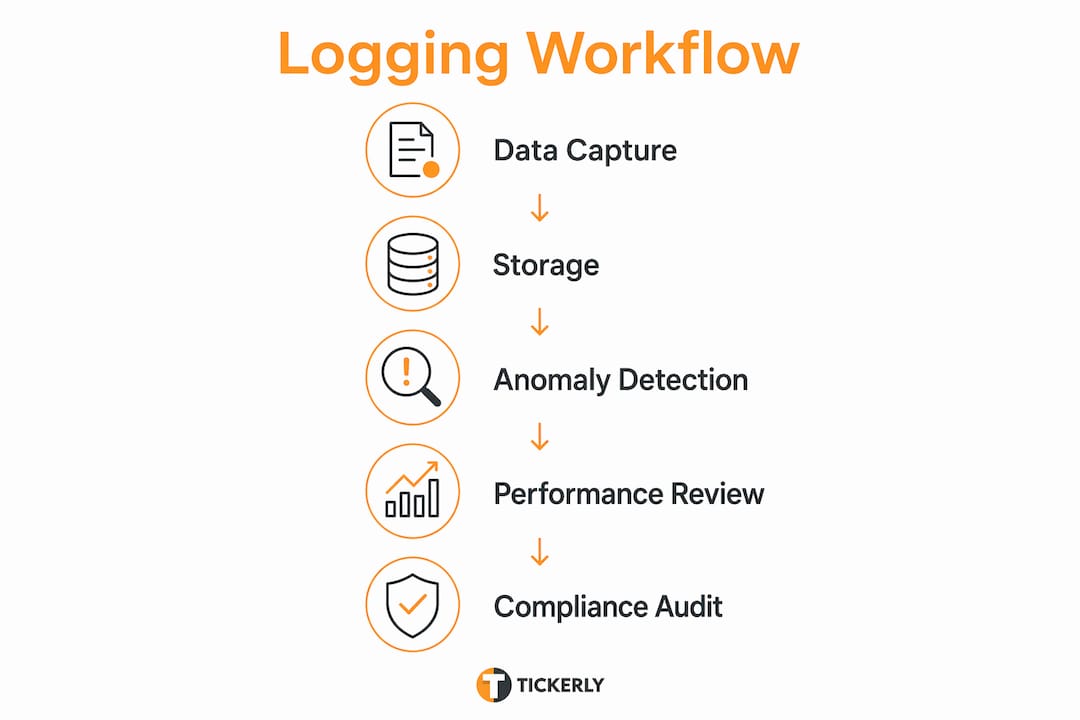
How do logs help with troubleshooting and debugging?
Debugging an automated trading system without logs is like diagnosing an engine failure with no instrument panel. Logs give you the instrument panel. Separating decision logs from application and system logs is the single most important architectural choice you can make. System logs tell you the bot ran. Decision logs tell you why it traded, or why it did not.
Here is a structured debugging workflow that experienced developers use:
- Check system health logs first. Confirm the bot connected to the exchange, received data feeds, and completed its initialization cycle. Missed heartbeats or unexpected reconnects in this layer distinguish infrastructure failures from strategy failures.
- Cross-reference decision logs with order logs. If a signal fired but no order appears, the issue lives in your risk-check layer or order routing. If an order appears but the fill is missing, the problem is at the exchange or broker level.
- Analyze fill quality logs. Compare the expected entry price from the signal log against the actual fill price in the execution log. Consistent gaps indicate slippage patterns tied to specific sessions, venues, or order sizes.
- Review API rate-limit and connectivity logs. Infrastructure bottlenecks such as exchange maintenance windows and API rate-limiting can cause up to 50% trade data loss. That figure means half your trades may lack a definitive win or loss record if you are not logging exchange status events.
- Audit rejected trade logs. Every trade your risk rules blocked should appear in a dedicated safety-check log. This record tells you whether your position-sizing or drawdown limits are firing correctly, or whether they are too aggressive and costing you valid setups.
Pro Tip: Set up a separate log file specifically for anomalies: partial fills, order rejections, and timeout events. Mixing these into your main trade log makes pattern detection much slower.
What are best practices for designing a logging framework?
A logging framework built correctly from the start saves hundreds of hours of debugging later. The core principle is separation. Log output should run as an independent helper process separated from your main trading logic. When logging shares the same thread as order execution, a slow write operation can delay a trade entry by milliseconds. In high-frequency or scalping strategies, that latency is a real cost.
Key design principles for a production-grade logging framework:
- Separate log types by function. Maintain distinct files or streams for market data logs, signal logs, risk-check logs, order results, and error logs. A data logging EA in MQL5, for example, separates OnInit, OnTick, and OnDeinit operations to improve traceability across the bot’s lifecycle.
- Use structured serialization. JSON or structured CSV formats allow downstream tools like Python pandas, Grafana, or custom dashboards to ingest logs without preprocessing.
- Implement shadow logging. Shadow logs capture every signal event, including those that did not result in a trade. This creates a complete record for post-mortem analysis and lets you compare what the strategy wanted to do against what it actually executed.
- Build automated exception alerts. Configure threshold-based alerts for slippage exceeding a defined basis-point limit, fill rates dropping below a target percentage, or strategy expectancy declining over a rolling window. You can review your alert log to track these notifications systematically.
- Design for immutability. Append-only or write-once-read-many storage is required for logs that need to withstand regulatory or legal scrutiny. Basic flat text logs are insufficient for enterprise-grade automated trading systems.
The goal is a logging architecture that any developer on your team can read and act on without needing to ask the original author what a field means.
How do logs drive performance optimization and compliance?
This is where logging pays its largest dividend. Logs decompose performance attribution by isolating alpha decay, filter impact, and execution leakage at the individual trade level. That means you can answer specific questions: Is the strategy losing edge because the signal is degrading, or because execution quality has worsened? Are losses concentrated in a specific session or market regime? Which version of the strategy performed better on live fills versus backtested fills?
The comparison between backtest results and live performance is one of the most common uses of trading log analysis. Logs let you run a forward test verification by replaying live log data through your backtesting engine and checking for divergence. If live fills consistently underperform backtest fills by more than a few basis points, your logs will show you exactly where the gap originates.
| Use Case | What Logs Enable |
|---|---|
| Backtest vs. live comparison | Quantifies execution leakage and slippage drift |
| Alpha decay detection | Identifies when a signal’s edge is fading over time |
| Compliance audit | Provides tamper-evident record of every decision and execution |
| Exception monitoring | Triggers alerts when performance metrics breach thresholds |
Daily summaries and automated alerting reduce the time required to review key metrics like fills, losses, open risk, and slippage. For traders running multiple bots across crypto, forex, and equities, this kind of summary dashboard is not a luxury. It is the only practical way to maintain performance discipline at scale.
On the compliance side, immutable audit trails are a legal requirement in capital management environments. Regulators and auditors need to verify that your system behaved as documented. Logs that can be altered after the fact provide no legal protection. WORM storage or append-only event streams satisfy this requirement and protect you in intervention audits.
Pro Tip: Build a weekly log review into your trading calendar. Pull a summary of fill rates, average slippage, and exception counts. Reviewing these three metrics weekly catches strategy drift before it becomes a drawdown.
Key takeaways
Effective logging is the foundation of every auditable, debuggable, and optimizable automated trading system.
| Point | Details |
|---|---|
| Capture standardized fields | Every order log must include timestamp, symbol, fees, and routing path. |
| Separate log types | Keep decision logs, system logs, and safety-check logs in distinct streams for faster debugging. |
| Use structured formats | JSON or structured CSV enables automated filtering and cohort analysis without manual parsing. |
| Build immutable storage | Append-only logs satisfy regulatory audit requirements and protect against post-hoc alteration. |
| Review logs on a schedule | Weekly reviews of fill rates, slippage, and exception counts catch performance drift early. |
Why most traders underuse their own logs
I have reviewed logging setups across dozens of automated trading operations, and the pattern is consistent. Traders spend significant time building the logging infrastructure and almost no time using it. The logs exist. The review cadence does not.
Traders often overbuild logs but neglect review cadence and underutilize automated alerts, missing early warning signs of slippage or expectancy drops. That observation matches what I see in practice. The fix is not more logging. It is defining specific use cases before you write a single log line. Ask yourself: what question will this log answer? If you cannot answer that, the field probably does not belong in your schema.
The other mistake I see regularly is treating system logs and decision logs as interchangeable. They are not. Without detailed decision logs, debugging performance issues is effectively impossible. You end up knowing that the bot ran but having no idea why it made the choices it did. That is the definition of a black box, and it is entirely avoidable.
My recommendation: start with a minimal schema covering the mandatory fields, add one automated alert for slippage threshold breaches, and commit to a weekly review. That combination alone will give you more diagnostic power than 90% of retail automated traders currently have. Scale the logging complexity only when you have a specific question that your current logs cannot answer.
— Jay
Take your automated trading further with Tickerly

Tickerly converts your TradingView Pine Script strategies into fully operational trading bots with real-time alert execution across crypto, forex, and stock exchanges. The platform is built for traders who need execution speed and monitoring clarity in a single place. Tickerly handles multiple strategies simultaneously, giving you the diversification and performance visibility that manual trading cannot match. If the logging and performance concepts in this article resonate with you, the next step is putting them into practice with a bot that executes without hesitation. Explore automated trading bots and see how Tickerly fits your strategy workflow.
FAQ
What is the role of logs in automated trading?
Logs in automated trading are the systematic records of trade decisions, order executions, system events, and risk-check outcomes that make performance analysis and debugging possible. They are the primary tool for diagnosing why a strategy’s live results diverge from its backtested performance.
What data should every automated trading log include?
Every order log should capture timestamp, symbol, side, quantity, order type, fill price, fees, venue, strategy ID, signal source, and routing path. These fields allow you to isolate slippage, latency, and fee drag as causes of performance divergence.
How do logs help debug a trading bot?
Logs let you trace a signal from generation through risk checks to order submission and fill confirmation. By separating decision logs from system logs, you can pinpoint whether a failure occurred in your strategy logic, your risk layer, or the exchange infrastructure.
Why do automated trading logs matter for compliance?
Regulators and auditors require tamper-evident records of every trading decision and execution. Immutable, append-only logs satisfy this requirement and provide legal protection during intervention audits in capital management environments.
How often should you review your trading bot logs?
A weekly review of fill rates, average slippage, and exception counts is the minimum effective cadence. Daily summary alerts for missed heartbeats, unexpected reconnects, or slippage threshold breaches complement the weekly review by catching acute failures in real time.