

Yes, you can turn a Pine Script strategy into a live trading bot by sending JSON alerts to a webhook that a bridge validates and converts into broker orders. The chain runs TradingView alert to webhook to bridge to broker. Pine Script only generates signals; the bridge handles execution, position sizing, and risk limits. Always inspect payloads with a webhook tool and paper trade before risking real capital.
TL;DR:
Most failures stem from symbol mismatches, malformed JSON alerts, or hitting TradingView’s alert limits, which can cause silent order errors.
Properly validating payloads, testing with local tools, and paper trading over weeks ensure accurate order execution and mitigate common setup issues.
TradingView’s alert frequency and timing controls should match backtested conditions to avoid phantom signals that can trigger unexpectedly.
Building a custom bridge requires handling authentication, symbol mapping, risk sizing, and speed, but managed platforms like Tickerly simplify deployment.
Automated trading is legal if conducted within broker terms and regulations, but success primarily depends on strategy quality and proper risk management at the bridge level.
Table of Contents
How Does a Pine Script to Trading Bot Pipeline Work?
Four components do the real work between a chart signal and a filled order. TradingView fires the alert first, substituting placeholders like {{close}} or {{strategy.order.action}} with live values at the exact moment the condition triggers.
That JSON payload travels to a webhook endpoint, where a listener checks a secret token, then parses the action, symbol, and any risk parameters you attached. From there, the Pine Script webhook alerts guide describes how the bridge takes over: it maps the TradingView ticker to the broker’s symbol format, calculates position size from your risk settings, and calls the broker’s API to place the order.
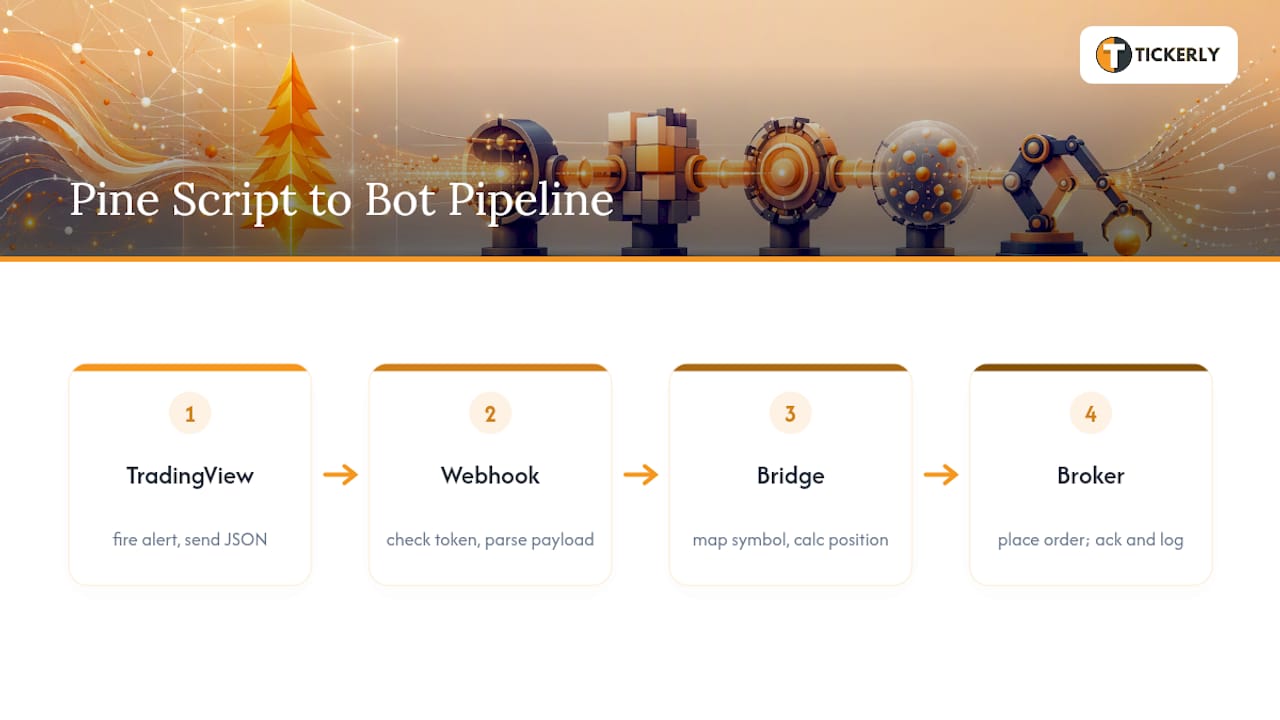
The bridge should also send a fast acknowledgement back and log the fill for reconciliation later. Skip that logging step and you’ll have no way to confirm the bot actually did what the alert asked. For a deeper look at how TradingView scripts generate these signals in the first place, see this breakdown of TradingView automation.
How Do You Format Pine Script Alerts for a Bot?
Your alert payload is the contract between Pine Script and everything downstream, so structure it as JSON rather than freeform text. A parser can reliably extract fields from JSON; it can’t reliably parse a sentence that changes wording every time you tweak the script.
On timing, match your alert frequency to how you backtested the strategy. Using alert.freq_once_per_bar_close, or guarding entries with barstate.isconfirmed, keeps live fires tied to the same bar your backtest used. Fire on every tick instead, and you’ll see phantom signals that never would have triggered in Pine Script’s strategy tester. TradingView’s own Pine Script documentation covers the full set of placeholders and frequency options worth testing before you commit to one setup. Community examples for alert payload formatting show working templates you can adapt directly.
What Should a Webhook Bridge Actually Do?
The bridge is where the real engineering happens, and it carries more responsibility than most traders expect going in. At minimum, it needs to validate the secret token, translate symbols between TradingView and your broker, size positions based on risk rather than fixed lots, enforce daily loss and max-position limits, call the broker’s API, and log every action for later audit.
You have two real paths here:
-
Managed bridges deploy faster, handle IP allowlisting for you, and scale across multiple strategies without added engineering work.
-
Custom-built bridges give you full control over compliance hooks and execution logic, at the cost of building and maintaining that infrastructure yourself.
One constraint applies no matter which path you pick: TradingView expects a fast HTTP response from your endpoint, generally under three seconds, or the alert delivery can fail silently. That single detail trips up more first-time bridge builders than almost anything else in the setup.
What Goes Wrong When You Automate a Pine Script Strategy?
Most silent failures trace back to a handful of repeat offenders. Ticker mapping mismatches send orders to the wrong instrument. Malformed JSON gets dropped without any error message. TradingView’s alert limits scale with your subscription plan, so a strategy running dozens of alerts can hit a ceiling you didn’t know existed. Intrabar signals that never appeared in your bar-close backtest will fire live and produce results your testing never predicted. Slippage and latency compound on top of all of it.
The fix lives at the bridge, not in Pine Script itself:
-
Set a daily loss limit that halts trading automatically
-
Cap the number of open positions at once
-
Size every trade from
risk_pctand stop distance, never a fixed lot size -
Build in an emergency kill switch you can trigger manually
-
Filter duplicate orders before they reach the broker
Symbol mapping and position sizing cause more account damage than any other single bridge failure, mostly because they fail quietly instead of throwing an obvious error.
Pro Tip: Log every rejected or malformed alert separately from successful trades. A spike in rejections almost always means a mapping or JSON formatting issue, and catching it early beats discovering it after three failed live trades.
Quick-Start Checklist: Going From Backtest to Live
Move through these steps in order, and don’t skip ahead once a step passes.
-
Confirm your
strategy()calls fire on bar close, or addbarstate.isconfirmedas a guard. -
Build your alert JSON and validate every placeholder at Tickerly
-
Deploy your bridge to a demo environment with symbol mapping and risk-based sizing in place.
-
Paper trade for a set run length, then reconcile every fill against your logs.
-
Enable your kill switch, then start live with the smallest position size your strategy allows.
For the alert-creation half of this, setting up TradingView alerts step by step will save you from rebuilding the wheel.
When Building Your Own Bridge Isn’t Worth It
Building a compliant webhook bridge from scratch is a real engineering project, not a weekend script. You’re handling authentication, symbol mapping across brokers, risk-based sizing math, and API integrations that each have their own failure modes.
Tickerly exists for exactly this gap. It converts TradingView alerts into fully functional trading bots without asking you to write or host a bridge, and it’s built to manage execution speed, exchange connections, and multiple strategies running at once. That matters most for traders running several Pine Script strategies simultaneously across crypto, forex, or stocks, where a single custom bridge would need to handle every broker’s quirks separately.
Building your own bridge still makes sense if you need a compliance hook a managed platform doesn’t offer, or execution routing specific enough that no general tool covers it. For most traders converting one or several TradingView strategies, a managed connector removes the operational weight entirely.— Jay
Getting Started With Tickerly’s Automated Trading Plans
This service turns the entire pipeline you just read about, alerts, webhook, bridge, broker, into a no-code setup, so you skip the ngrok tunnels and the custom symbol-mapping logic entirely.

You connect your TradingView alerts directly, and The platform handles the validation, mapping, and order execution behind them. It runs on a 30-day free trial, allowing users to paper trade their exact strategy through the platform before committing real capital, matching the same testing discipline this article just walked through. Plans support multiple simultaneous strategies, so if you’re running more than one Pine Script setup across crypto, forex, or stocks, you’re not juggling separate bridges for each one.
Ready to see plan details and pricing tiers? Visit the automated trading plans page to compare Level 2, Level 3, Level 4, and Level 4 Ultra, then start your trial and paper trade before flipping the switch to live.
Where to Learn More About Pine Script Automation
A handful of primary sources cover everything a serious builder needs beyond this article. TradingView’s own Pine Script documentation is the definitive reference for placeholders, strategy functions, and alert frequency settings.
If you want to study working code rather than just theory, the Trading-Robot-pinescript repository on GitHub shows how strategy.entry() calls wire into alert firing in practice.
On the compliance side, a CFTC speech on automated trading and market structure confirms that automated systems are a legitimate, widely used tool for retail and institutional traders alike, provided you follow your broker’s terms and applicable regulations.
Sources
FAQ
Is It Legal to Build an Automated Trading Bot?
Yes. Regulators including the CFTC treat automated trading as a legitimate tool for retail and institutional traders, as long as you comply with your broker’s terms and applicable financial regulations. The bot itself isn’t the legal issue; your strategy, market, and jurisdiction determine what rules apply.
Can You Actually Code a Trading Bot Yourself?
Yes, and the pipeline described above (alert, webhook, bridge, broker) is exactly how independent developers do it. The harder part isn’t the code itself but building the bridge logic correctly: symbol mapping, risk-based position sizing, and daily-loss controls all need careful implementation before you trust it with real money.
Can ChatGPT Write a Trading Bot for You?
ChatGPT and similar tools can scaffold Pine Script or draft your JSON payload structure, which saves real time on boilerplate. It can’t replace the testing process itself. You still need webhook inspection, a local bridge test with a tool like ngrok, and weeks of paper trading before that scaffolded code touches a live account.
Are Trading Bots Actually Profitable?
Trading bots don’t create profitability on their own. They execute your predefined rules consistently and without emotional interference, which means a sound strategy tends to perform closer to its backtest, while a flawed one loses money faster and more consistently than a human trader might. Profitability comes down to strategy quality, risk controls at the bridge level, and how closely your live execution matches your backtested bar-close logic.
How Much Does Tickerly Cost to Automate a Strategy?
Plans start at $19 per month, with higher tiers available for more strategies and alert volume. Full pricing details sit on the automated trading plans page, alongside the 30-day trial for testing before you commit.
Recommended
-
Master the trading strategy development process on TradingView
-
Effective Backtesting: How to Validate Your Trading Strategies
This article was produced with Al assistance and reviewed for accuracy. It is provided for general information only and is not professional or financial advice.