

If you’re looking for the single best pick among today’s crop of automated trading tools, it’s Tickerly, and the reason comes down to one thing: it turns your existing TradingView strategy into a live, executing bot without asking you to learn a new scripting language or manage a separate coding environment. For traders who already build and test strategies on TradingView, that’s the shortest path from idea to execution that exists in this market right now.
Here’s the shortlist worth knowing before you commit to anything:
- Tickerly — best overall for TradingView users who want no-code deployment and fast execution across exchanges.
- Trade Ideas (Holly AI) — best for active day traders who want nightly AI-generated stock scans.
- TrendSpider — best for traders who lean on automated chart pattern recognition.
- Tickeron — best for hands-off investors who want AI-managed portfolios rather than a single strategy.
- StockHero — best for beginners who want a no-code bot marketplace to start from.
Independent coverage backs up why this category has gotten crowded: Finder’s 2026 roundup tracks 10 separate AI trading platforms spanning stocks, forex, and crypto, each with different pricing and market focus. Execution speed matters more than most beginners assume, too. Cloud-based execution paths can run at roughly 5 to 10 milliseconds versus 100 to 250 milliseconds for typical webhook bridges, a gap that shows up directly in slippage on fast-moving names.
None of this is financial advice. Every bot on this list can lose money, and results depend on the strategy behind it, not just the software running it. Paper trade before you commit real capital, and treat every performance claim you read (including this article’s) with a healthy dose of skepticism until you’ve verified it yourself.
Key Takeaways
Tickerly’s TradingView-native conversion process gives traders with existing Pine Script strategies the fastest, lowest-friction path from signal to live execution available in this category.
| Point | Details |
|---|---|
| Start with paper trading | Validate any bot’s backtest against real paper-trade logs before risking capital. |
| Match the platform to your market | Trade Ideas suits U.S. equity scanning; MetaTrader suits deep forex scripting; Tickeron suits hands-off portfolios. |
| Execution speed changes outcomes | Cloud-native execution can run at 5 to 10 milliseconds versus 100 to 250 milliseconds for webhook bridges. |
| Check regulatory standing for futures | Confirm broker registration through the National Futures Association before connecting live funds. |
| Choose Tickerly for TradingView strategies | Tickerly converts existing TradingView alerts directly into live bots with no-code setup and multi-asset support. |
Table of Contents
- Best Stock Trading Bots Compared at a Glance
- Which Stock Trading Bots Are Worth Your Time?
- How Do You Choose the Right Trading Bot for Your Goals?
- How Do You Safely Launch a Trading Bot?
- What Do Stock Trading Bots Actually Do, and Where Do They Fall Short?
- Why Tickerly Fits TradingView-Native Traders
- Sources
- FAQ
Best Stock Trading Bots Compared at a Glance
Picking the right platform starts with knowing what each one actually optimizes for. Some are built for scanning U.S. equities overnight. Others exist purely to convert a TradingView script into a live order. The table below lines up the dimensions that matter most: market coverage, setup effort, execution path, and price.
| Platform | Best For | Supported Markets | Setup Effort | Backtesting/Paper Trading | Pricing (Monthly) |
|---|---|---|---|---|---|
| Tickerly | TradingView users wanting no-code automation | Crypto, forex, stocks, futures, prop firms | No-code, direct TradingView alert conversion | Supported via TradingView strategy tester | Tiered plans after 30-day free trial |
| Trade Ideas (Holly AI) | Active day traders needing daily signals | U.S. equities | No-code, built-in scanner | Integrated backtesting | About $89 to $254 per month depending on tier |
| TrendSpider | Automated technical analysis and chart automation | U.S. equities, some crypto | No-code strategy builder | Built-in backtesting | Mid-range subscription tiers |
| Edgeful | Quant/futures traders who want statistical setups | Futures, stocks, forex | No-code, prebuilt statistical reports | Historical win-rate reporting | Subscription, pricing varies by plan |
| Intellectia.ai | Traders wanting AI research plus signals | Stocks, crypto | No-code, conversational interface | Limited paper-trade features | Tiered subscription |
| Tickeron | Hands-off investors wanting AI portfolios | Stocks, some crypto | No-code, marketplace of AI robots | Backtesting on select robots | Tiered subscription |
| StockHero | Beginners wanting a bot marketplace | Crypto, some stocks | No-code, marketplace or wizard | Paper-trading supported | Free tier plus paid tiers |
| 3Commas | Crypto traders needing portfolio automation | Crypto, multi-exchange | No-code, bot templates | Paper trading available | Tiered subscription |
| MetaTrader 4/5 with AI plugins | Forex/CFD traders wanting scripting depth | Forex, CFDs | Scripting (MQL) plus plugin ecosystem | Robust historical backtesting | Platform free; plugins vary in cost |
| Superalgos | Developers wanting open-source visual bots | Crypto, forex | Visual builder, open-source | Backtesting supported | Free, open-source |
| Public Agents | Public brokerage users wanting integrated agents | U.S. equities, options | Prompt-based, no-code | Workflow logging, limited backtesting | Included with Public brokerage account |
Pricing ranges above reflect publicly available figures where vendors disclose them; several platforms gate advanced AI features behind premium tiers, a pattern independent reviewers flag consistently across this category.
A few trade-offs jump out once you line these platforms up side by side:
- Speed versus flexibility: Tickerly and cloud-native execution tools trade some of the scripting depth of MetaTrader for dramatically faster order placement.
- Marketplace versus DIY: Tickeron and StockHero let you rent someone else’s strategy; Superalgos and MetaTrader assume you’re building your own.
- Broad markets versus narrow specialization: platforms like Trade Ideas go deep on U.S. equities alone, while Tickerly and 3Commas span multiple asset classes from one dashboard.
Pro Tip: Before comparing price tags, check whether “backtesting” on a given platform means testing against real historical tick data or just a simplified simulation. The difference changes how much you should trust the numbers.
Which Stock Trading Bots Are Worth Your Time?
Every platform on this list solves a slightly different problem, and the right one for you depends heavily on what you’re already using to build strategies.
Tickerly stands apart because it doesn’t ask you to abandon TradingView. If you already write Pine Script strategies or set up alerts, Tickerly connects that work directly to live execution across supported exchanges. TradingView itself has no native live-execution engine. As Lunefi’s 2026 guide points out, users have historically relied on webhook bridges or third-party platforms to turn alerts into trades. Tickerly closes that gap with a direct pipeline instead of a patchwork of bridge services.
- Pros: No-code conversion of TradingView alerts, multi-asset support across crypto, forex, stocks, futures, and prop firm accounts, fast execution, ability to run unlimited strategies simultaneously.
- Cons: Requires an existing TradingView strategy or alert setup to get the most value; newer entrants may take time to build a long independent review history.
- Pricing: Tiered monthly and annual plans based on asset classes, strategy count, and alert limits, with a 30-day free trial.
- Integrations: Multiple exchange APIs plus MetaTrader 4/5 support.
- Setup effort: No-code; built for Pine Script developers and TradingView users specifically.
- Backtest/paper-trade support: Strategies can be validated through TradingView’s own strategy tester before going live.
- Best for: TradingView users who want their existing strategies automated without learning a new platform.
Trade Ideas (Holly AI) built its reputation on overnight algorithmic scans. The Holly engine runs a large batch of algorithms against U.S. equities every night and surfaces the setups with the highest historical hit rate. Stockbrokers notes real-time tiers run from roughly $89 to $254 a month, with the most advanced AI scanning features reserved for higher tiers.
- Pros: Deep U.S. equity scanning, integrated backtesting, automated execution options.
- Cons: Narrow to U.S. stocks, premium AI features gated behind pricier plans.
- Pricing: Roughly $89 to $254 monthly depending on plan.
- Integrations: Works with several U.S. equity brokers; execution automation varies by tier.
- Setup effort: No-code, scanner-driven.
- Best for: Day traders who want a daily list of high-probability stock setups without building their own scanner.
TrendSpider takes a different approach: instead of generating trade ideas from scratch, it automates the chart work traders already do by hand. Trendline detection, multi-timeframe analysis, and an AI assistant called Sidekick handle pattern recognition across your watchlist.
- Pros: Strong automated technical analysis, works across multiple timeframes at once, useful for traders who think in chart patterns.
- Cons: Less focused on generative trade ideas than pure signal services; learning curve for full feature set.
- Pricing: Mid-range subscription tiers, varies by plan.
- Integrations: Broker connections for select execution features.
- Best for: Traders who prioritize automated charting over raw signal generation.
Edgeful leans quant. Rather than telling you what to buy, it tells you the historical odds of a given setup working, whether that’s a gap fill, an opening range breakout, or another statistically defined pattern across futures, stocks, and forex.
- Pros: Statistical rigor, useful for futures and quant-style traders who want probability data over opinion.
- Cons: Requires comfort reading probability reports rather than plain-language signals; narrower appeal for casual traders.
- Pricing: Subscription based, varies by plan.
- Best for: Quant and futures traders who want historical win-rate data behind every setup.
Intellectia.ai functions more like a research assistant than an execution engine. It reads earnings calls and news, summarizes them in plain language, and layers in swing-trade signals for stocks and crypto.
- Pros: Natural-language research summaries, useful for traders who want context alongside signals.
- Cons: Lighter on execution and paper-trading depth compared to dedicated automation platforms.
- Pricing: Tiered subscription.
- Best for: Traders who want AI-generated research and swing signals rather than full automation.
Tickeron takes the marketplace approach one step further by packaging AI-managed portfolios rather than single strategies. Its Trend Prediction Engine generates probability-based trade ideas, and its AI robot marketplace lets less hands-on investors buy into a curated portfolio instead of building one.
- Pros: Portfolio-level automation, useful for investors who don’t want to manage individual trades.
- Cons: Less granular control than a custom-built strategy; performance depends heavily on which robot you choose.
- Pricing: Tiered subscription.
- Best for: Hands-off investors who prefer AI-curated portfolios over single-strategy bots.
StockHero is aimed squarely at beginners. Its bot rental marketplace lets you deploy someone else’s strategy without writing a line of code, and its wizard walks you through building a simple bot from scratch with paper-trading built in.
- Pros: Low barrier to entry, marketplace variety, paper trading included.
- Cons: Rented strategies carry the same overfitting risk as any third-party bot; quality varies by creator.
- Pricing: Free tier available, paid tiers for advanced features.
- Best for: Beginners who want a marketplace and guided bot creation rather than building from zero.
3Commas built its name in crypto portfolio automation. Its dollar-cost-averaging and grid bots, plus rebalancing tools, make it a common pick for traders running multiple exchange accounts at once.
- Pros: Strong crypto-specific bot templates, multi-exchange support, active user community.
- Cons: Primarily crypto focused, less relevant for pure equity traders.
- Pricing: Tiered subscription.
- Best for: Crypto traders who want portfolio-level automation across several exchanges.
MetaTrader 4/5 with AI plugins remains the default for a large share of forex and CFD traders, largely because of its scripting depth. Expert Advisors (EAs) written in MQL let developers build almost any strategy imaginable, and the historical backtesting tools are mature.
- Pros: Massive EA marketplace, deep historical backtesting, broad broker support.
- Cons: Requires coding knowledge (or paying for a pre-built EA) to get real value; not TradingView-native.
- Pricing: Platform itself is free; plugin and EA costs vary widely.
- Best for: Forex and CFD traders who want full control over strategy logic through scripting.
Superalgos is the open-source option for developers who want to see and modify every line of the automation logic. Its visual builder makes strategy design more approachable than raw code, without hiding the underlying architecture.
- Pros: Free and open-source, extensible, transparent logic.
- Cons: Requires more technical comfort than commercial no-code platforms; support is community-driven.
- Pricing: Free.
- Best for: Developers who want an open-source, visually built bot they can fully customize.
Public Agents brings automation directly into the Public brokerage app. Prompt-based workflows let users set conditional strategies and options logic without leaving the brokerage interface, with workflow logging built in for transparency.
- Pros: Native brokerage integration, prompt-driven simplicity, built-in logging.
- Cons: Only useful if you already hold a Public brokerage account; limited to that ecosystem.
- Pricing: Included with a Public brokerage account.
- Best for: Public brokerage users who want automation without a separate third-party tool.
For readers researching Trade Ideas and Intellectual.ai as separate entries: both appear in broader 2026 platform roundups as AI-driven trading tools, though public detail on Intellectual.ai’s specific feature set and pricing is limited compared to the other platforms above. Treat any platform with thin public documentation as one to vet carefully during a sales call before committing.
How Do You Choose the Right Trading Bot for Your Goals?
Work through this checklist before you sign up for anything, in roughly this order of priority:
- Market focus. Confirm the bot actually supports the asset class you trade. A platform built for U.S. equities won’t help you with futures.
- Broker connectivity. Verify the specific brokers or exchanges you use are supported, not just “major exchanges” in marketing copy.
- Strategy portability. If you already have a TradingView strategy or Pine Script, check whether the platform can import it directly or requires a rebuild.
- Backtest fidelity. Distinguish between real historical tick-data backtesting and simplified simulation.
- Paper-trading depth. Confirm you can run the exact strategy live in simulation before committing capital.
- Risk controls. Look for stop-loss automation, position sizing limits, and circuit breakers that halt trading during abnormal conditions.
- Pricing model. Understand whether you’re paying per strategy, per alert, or a flat tier, and what happens if you exceed limits.
- Regulatory standing. For futures strategies specifically, check broker registration through resources like the National Futures Association before connecting live funds.
During a trial or sales call, ask vendors directly:
- What’s your actual execution latency, measured, not estimated?
- What are the limits on paper-trading or simulation accounts?
- Which order types are supported (market, limit, stop-limit, trailing stop)?
- What happens if the connection to my broker drops mid-trade?
Watch for these red flags: no paper-trading or backtesting option at all, pricing that’s only revealed after a sales call, no API logs or audit trail you can review, and vague answers about where your trading data is stored.
Pro Tip: Run the exact same strategy in paper trading for at least two weeks and compare the timestamped fill prices against what the backtest predicted. The gap between those two numbers is your real-world slippage, and it’s the number that actually determines profitability.
How Do You Safely Launch a Trading Bot?
Getting a bot live safely is a sequence, not a single step:
- Connect your brokerage or exchange API using read-only permissions first, then upgrade to trading permissions once you’ve verified the connection.
- Run the strategy in paper trading for at least two weeks under real market conditions.
- Compare paper-trade results against your original backtest. Large gaps signal overfitting or unrealistic assumptions.
- Set risk controls before going live: stop-loss levels, maximum position size, and a circuit breaker that halts trading after a defined loss threshold.
- Go live with a small fraction of your intended capital.
- Monitor daily, then scale gradually as live results confirm the backtest and paper-trade data.
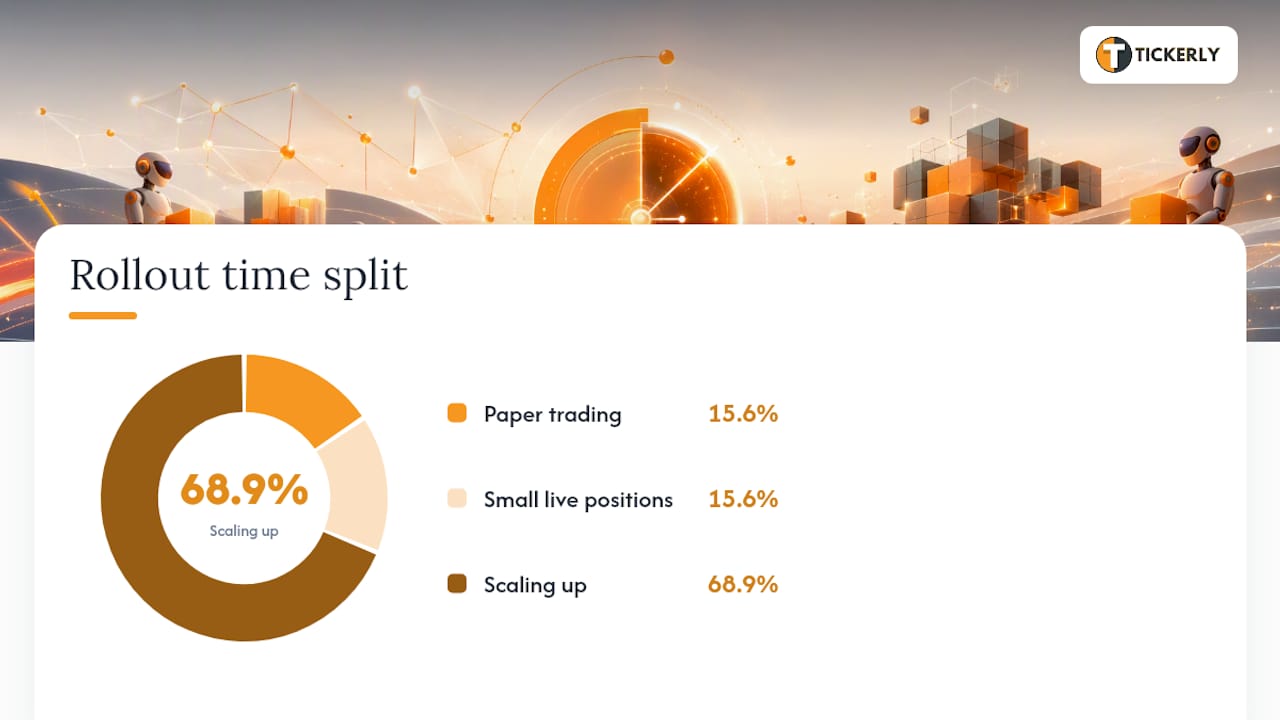
A rough 90-day rollout: weeks 0 through 2 for paper trading, weeks 3 and 4 for small live positions, and months 2 through 3 for scaling up as confidence builds.
Pro Tip: Set alert rules that notify you the moment daily losses cross a defined threshold, and check your bot’s log file every single day for the first month. Automation reduces effort, not oversight.
What Do Stock Trading Bots Actually Do, and Where Do They Fall Short?
An AI stock trading bot combines three functions: it generates or receives a signal, executes the resulting order, and applies risk rules automatically, without a human clicking the buy or sell button. That’s the entire value proposition.

The limits are just as real as the benefits. Overfitting is common. A strategy tuned too precisely to past data on U.S. equities can look great in a backtest and fail the moment volatility patterns shift. Data quality varies by provider, and execution latency differences (milliseconds versus hundreds of milliseconds) can turn a good signal into a bad fill. Market regime shifts, like a sudden rate change or geopolitical shock, routinely break strategies that worked fine for months.
Bots also behave differently across asset classes. U.S. equity bots deal with market hours and gaps; futures bots need to handle much faster price action; crypto bots run 24/7 with no closing bell at all.
How We Chose These Picks
Our evaluation weighed TradingView integration depth, execution reliability, broker/exchange API coverage, backtesting fidelity, and pricing transparency. Sources consulted include vendor documentation, Finder’s platform roundup, StockBrokers.com’s guide to AI trading bots, and publicly available TradingView community scripts used to verify strategy logic before automation.
Picks here prioritize platforms with strong TradingView integration and demonstrated execution reliability, since those two factors determine whether a strategy that works on paper actually works with real capital behind it.
This article is for informational purposes only and is not financial advice. Test every strategy with paper trading before committing real capital, and understand that past performance never guarantees future results.
A Practical Note From the Team
Backtests are clean. Live markets aren’t. The gap between the two is where most automated strategies actually fail, not in the logic itself, but in execution timing, slippage, and the moments when a market regime shifts faster than a strategy was built to handle. shapes a lot of how we think about this category: the platforms that hold up over time are the ones that make paper-to-live validation easy, not the ones with the flashiest signal dashboards. is worth watching closely if you want a real sense of what “fast execution” means in practice, because the marketing language rarely matches the millisecond reality.
Why Tickerly Fits TradingView-Native Traders
If you’ve built a strategy on TradingView and you’re tired of manually watching for alerts to fire, Tickerly closes that exact gap. It converts your TradingView strategies and alerts directly into live trading bots, no coding required beyond what you’ve already written in Pine Script.

A few specifics worth knowing before you try it:
- Direct conversion of TradingView alerts into executing bots across crypto, forex, stocks, futures, and prop firm accounts.
- Fast execution designed to minimize the gap between signal and fill.
- Support for unlimited strategies and alerts running simultaneously, useful if you diversify across multiple setups.
- Exchange API integration plus MetaTrader 4/5 compatibility for traders who split time between platforms.
Tickerly runs on a 30-day free trial, followed by tiered subscription plans based on the asset classes, strategy count, and alert volume you need. If you want to see the mechanics before committing, the step-by-step guide to automating TradingView strategies walks through the exact connection process, and the automated trading FAQ covers security, data handling, and support availability. If your strategy already lives on TradingView, starting a trial is the fastest way to find out whether automation actually improves your results, or just your peace of mind.
Sources
This article is general information, not a substitute for advice from a qualified financial advisor. Consult a qualified financial professional about your own circumstances before acting on anything here.
FAQ
Which Is the Most Successful Trading Bot?
There’s no single bot that outperforms every other in every market condition. Success depends heavily on the strategy behind the bot and the asset class involved; TradingView-native platforms like Tickerly tend to perform best for traders who already have a validated Pine Script strategy to automate.
Can You Make $1,000 a Day Day Trading?
It’s possible on certain trading days with enough capital and volatility, but it isn’t a realistic baseline expectation. Most day traders, automated or manual, see far more modest and inconsistent results, and losses on other days can offset any large single-day gain.
Are Stock Trading Bots Profitable?
Profitability depends entirely on the underlying strategy’s quality, execution speed, and risk controls, not on automation itself. A poorly designed strategy loses money faster when automated, since a bot removes the emotional hesitation that sometimes prevents a bad trade.
What Is the Most Successful AI Stock Trading App?
No single app can claim that title across every trader type. Active day traders often lean toward Trade Ideas for its nightly scans, while traders with existing TradingView strategies typically get the most value from Tickerly’s direct alert-to-execution conversion.
Do I Need Coding Skills to Use a Trading Bot?
Not necessarily. No-code platforms like Tickerly, StockHero, and Tickeron let you deploy strategies without writing scripts, while platforms like MetaTrader and Superalgos reward users comfortable with scripting or visual logic building.