

For most TradingView-based traders, Tickerly is the top pick among the best algorithmic trading platforms in 2026, thanks to its no-code strategy automation and execution speed. If your priorities skew toward deep quantitative research, QuantConnect leads on backtesting infrastructure. For active US equities traders who want broker-grade order types, TradeStation and Interactive Brokers remain the benchmarks. This shortlist reflects what actually determines whether an automated strategy survives contact with live markets: execution reliability, broker connectivity, backtest realism, and how much engineering effort stands between your strategy idea and a live order.
Here’s the fuller shortlist, each with a one-line reason it made the cut:
-
Tickerly — best for TradingView users who want alerts converted into live bots without writing a line of code.
-
QuantConnect — best for quant researchers building multi-asset strategies in Python or C#.
-
Interactive Brokers — best for multi-asset traders who need broad global market access and low execution costs.
-
TradeStation — best for active US equities and options traders who want institutional-grade order types.
-
TrendSpider — best for chart-first technical traders who want automated triggers tied to indicators.
-
Trade Ideas — best for equities traders who want AI-driven idea generation paired with automated execution.
-
Coinrule — best for retail crypto traders who prefer template-based, no-code rule building.
-
Alpaca — best for developers who want to build and host their own trading infrastructure via API.
-
MetaTrader 4/5 — best for forex and CFD traders already working inside broker-provided MT4/MT5 environments.
“Best” here means a platform scored well on TradingView or strategy-alert automation, breadth of API and broker support, backtesting fidelity, and demonstrated execution reliability rather than star ratings alone. This comparison reflects the current 2026 vendor landscape and was last reviewed this year against public documentation and market roundups from sources including Investing and WallStreetZen.
Key Takeaways
Choosing among the best algorithmic trading platforms comes down to matching execution speed, broker connectivity, and coding requirements to your specific trading style.
| Point | Details |
|---|---|
| Match platform to strategy type | No-code tools like Tickerly fit TradingView alerts; code-first tools like QuantConnect fit custom quant research. |
| Backtest realism matters most | Confirm slippage, spread, and walk-forward testing are modeled before trusting any backtest result. |
| Ask about execution latency upfront | Get a specific answer on signal-to-order speed during any vendor demo, not a vague promise. |
| Verify broker and exchange connectivity | Confirm native support for your specific broker or exchange before signing up. |
| Tickerly leads for TradingView automation | Tickerly converts TradingView alerts into live bots with no-code setup and a 30-day free trial. |
Table of Contents
How Do the Best Algorithmic Trading Platforms Compare?
The differences between these platforms show up fastest when you line them up side by side. Pricing shape alone splits the field: some vendors run a straightforward subscription, others are free-to-use APIs with brokerage commissions folded in, and a few are open-source with no license fee but real hosting costs.
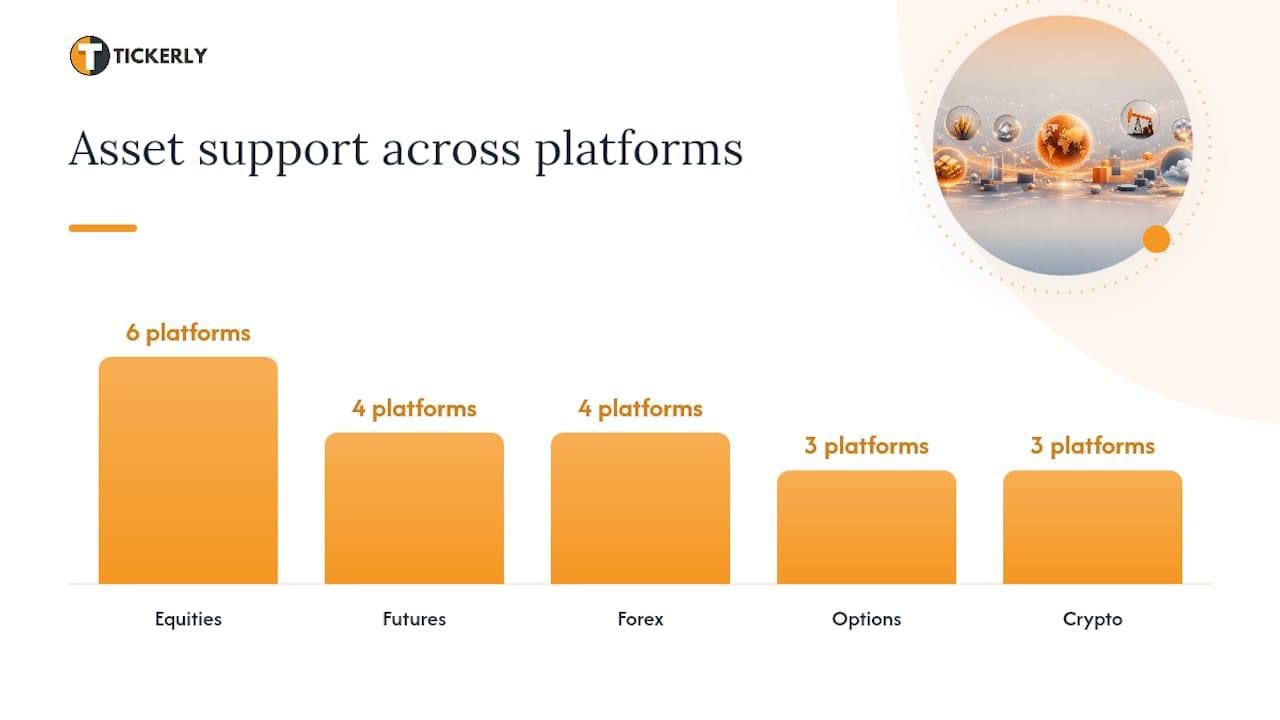
| Platform | Best For | Pricing Shape | Assets & Connectivity | Coding / No-Code | Backtesting |
|---|---|---|---|---|---|
| Tickerly | TradingView automation, fast setup | Subscription tiers, 30-day trial | Crypto, forex, stocks, futures, prop firms | No-code, Pine Script alerts | Relies on TradingView’s own backtester |
| TradeStation | US equities & options traders | Commission-based, platform fees vary | US equities, options, futures | EasyLanguage scripting | Built-in strategy backtesting |
| Interactive Brokers | Multi-asset global access | Commission-based, tiered | Stocks, options, futures, forex, bonds | API (Python, Java, C++) | IBKR TWS API backtesting tools |
| TrendSpider | Chart-based automated triggers | Subscription tiers | Stocks, forex, crypto | No-code rule builder | Built-in strategy tester |
| QuantConnect | Quant research & multi-asset strategies | Free tier; paid cloud compute | Equities, forex, crypto, futures, options | Python, C# (LEAN engine) | Extensive historical data, walk-forward support |
| Trade Ideas | AI-driven idea generation | Subscription tiers | US equities | No-code plus scripting via Holly AI | Built-in scanner-based backtesting |
| Coinrule | No-code crypto rules | Free tier; subscription | Crypto exchanges | No-code template builder | Limited backtesting, rule simulation |
| Alpaca | Developer-built strategies | Free API; commission-free US equities | US equities, crypto | Python, REST/WebSocket API | Requires third-party backtesting tools |
| MetaTrader 4/5 | Forex & CFD via broker infrastructure | Free platform; broker-dependent fees | Forex, CFDs, some crypto | MQL4/MQL5 (Expert Advisors) | Built-in strategy tester |
Details here are sourced from vendor documentation and public feature listings rather than internal testing of every platform, so confirm current pricing and asset coverage directly with each vendor before committing. The table intentionally leaves out platforms where public pricing or connectivity details aren’t reliably documented, including Oanda, IG, StockSharp, the0, PowerX Optimizer, Mindful Trader, Stock Market Guides, and Botsfolio, all of which get fuller treatment in the profiles below.
What Makes Each Top Algorithmic Trading Platform Different?
Every platform on this list solves the same basic problem (turning a trading idea into repeatable, unattended execution) but the path to get there varies enormously. Some prioritize a code-free experience, others hand you a full SDK and expect you to build your own dashboard.
Tickerly converts TradingView strategy alerts directly into live trading bots without requiring you to touch a broker API yourself. It supports crypto, forex, stocks, futures, and prop firm accounts, and it connects to multiple exchanges from one account.
-
Key features: no-code TradingView alert conversion, unlimited strategies and alerts, multi-asset and multi-platform support including MetaTrader 4/5.
-
Best for: TradingView users and Pine Script developers who want fast, reliable automation who want to focus on strategy development.
-
Pricing shape: tiered monthly and annual subscriptions based on asset classes and alert volume, with a 30-day free trial.
-
Pros: fast setup, real-time execution, handles multiple strategies simultaneously.
-
Cons: depends on TradingView for chart-based signal generation; not built for traders who want to code strategies from scratch outside Pine Script.
Pro Tip: If you already run a TradingView strategy you trust, test it as a paper-trading webhook in Tickerly before switching it to live capital. It confirms your alert formatting and execution path work correctly before real money is on the line.
TradeStation pairs a full-service brokerage with EasyLanguage scripting and advanced order types like bracket orders and conditional triggers.
-
Key features: institutional-grade order routing, deep charting, EasyLanguage strategy automation.
-
Best for: active US equities and options traders who want broker and platform in one place.
-
Pricing shape: commission-based with platform fees that vary by account tier.
-
Pros: mature order execution, strong charting tools, direct market access.
-
Cons: EasyLanguage has a learning curve, and the platform is less friendly to crypto or forex traders.
Interactive Brokers gives multi-asset traders access to more than 150 markets worldwide through a mature API stack.
-
Key features: broad global exchange access, Python/Java/C++ APIs, low per-share and per-contract costs.
-
Best for: multi-asset traders and small institutions that need wide market access with low execution costs.
-
Pricing shape: commission-based, tiered by volume.
-
Pros: exceptional market breadth, professional-grade execution, established API documentation.
-
Cons: interface has a steep learning curve, and account minimums can deter casual traders.
TrendSpider builds automation around chart patterns and technical indicators rather than raw code.
-
Key features: automated technical analysis, multi-timeframe alerts, no-code strategy triggers.
-
Best for: technical traders who want to automate chart-based setups without scripting.
-
Pricing shape: subscription tiers, varies by feature access.
-
Pros: intuitive for chart-focused traders, strong alerting system, good for swing trading automation.
-
Cons: less suited to high-frequency execution, limited asset coverage compared to broker-native platforms.
QuantConnect runs on the open-source LEAN engine and supports Python and C# across equities, forex, crypto, futures, and options.
-
Key features: cloud backtesting, large historical datasets, active open-source community.
-
Best for: quant researchers and developers building and testing multi-asset systematic strategies.
-
Pricing shape: free tier for research; paid cloud compute for live deployment.
-
Pros: strong backtesting depth, large strategy library, transparent open-source engine.
-
Cons: requires coding proficiency, and live deployment costs can add up for compute-heavy strategies.
Trade Ideas layers AI-driven scanning (its Holly AI feature) on top of automated execution for US equities.
-
Key features: real-time market scanning, AI-generated trade ideas, automated order execution.
-
Best for: equities traders who want algorithmic idea generation, not just execution automation.
-
Pricing shape: subscription tiers, varies / see vendor for current rates.
-
Pros: unique AI scanning angle, good for day traders hunting setups, active community.
-
Cons: US equities focus limits use for forex or crypto traders, and AI signals still require trader judgment.
Coinrule targets retail crypto traders who want rule-based automation without writing code.
-
Key features: drag-and-drop rule builder, template strategies, multi-exchange connectors.
-
Best for: retail crypto traders who prefer templates over custom scripting.
-
Pricing shape: free tier; paid subscription for more exchanges and rules.
-
Pros: fast onboarding, good template library, beginner-friendly.
-
Cons: backtesting is limited compared to code-first platforms, and advanced strategy logic is harder to express in rule form.
Alpaca is an API-first brokerage built for developers who want full control over strategy logic and hosting.
-
Key features: commission-free US equities and crypto trading, REST and WebSocket APIs, developer SDKs.
-
Best for: developers and small teams building custom algo infrastructure from scratch.
-
Pricing shape: free API access; monetization through order flow and premium data.
-
Pros: clean developer experience, fast API response times, active open-source SDK community.
-
Cons: no built-in backtesting or charting, so you need third-party tools to validate strategies first.
MetaTrader 4/5 remains the default for forex and CFD traders working through broker-supplied infrastructure and MQL-based Expert Advisors.
-
Key features: mature scripting environment, wide broker support, built-in strategy tester.
-
Best for: forex and CFD traders whose broker already runs on MT4 or MT5.
-
Pricing shape: free platform, though your broker’s spreads and commissions apply.
-
Pros: massive EA marketplace, broad broker compatibility, familiar interface for forex traders.
-
Cons: MQL is a niche language outside forex/CFD contexts, and backtest fidelity varies by broker’s historical data quality.
A handful of other platforms deserve a mention even without a full breakdown. Oanda offers stable REST APIs for retail forex traders who want regulated broker access alongside developer tools. IG and StockSharp show up frequently in broker and open-source roundups, with StockSharp in particular offering free C# libraries and connectors to dozens of exchanges including Binance, Interactive Brokers, and Coinbase, according to its GitHub documentation. the0 is a newer open-source execution engine supporting Python, Rust, TypeScript, and several other languages for teams that want self-hosted, Docker-based bot deployment. PowerX Optimizer, Mindful Trader, Stock Market Guides, and Botsfolio each occupy smaller niches around signal services and semi-automated strategy tools, and pricing for these varies / see vendor since public documentation is limited.
How Do You Choose the Right Algorithmic Trading Platform?
Picking a platform without a checklist is how traders end up locked into a subscription that can’t do what they actually need six months later. Run through these criteria before you commit real capital.
Ten selection criteria that actually matter:
-
Asset coverage: does it support the specific markets you trade (crypto, forex, stocks, futures)?
-
Execution latency: how fast does an alert or signal turn into a live order?
-
API type: REST, WebSocket, or FIX, and does that match your strategy’s speed requirements?
-
Backtesting realism: does it model slippage, spread, and realistic fill assumptions?
-
Data quality: is historical data point-in-time accurate, or does it suffer from survivorship bias?
-
Broker/exchange connectivity: which brokers or exchanges does it plug into natively?
-
No-code vs. coding requirement: does it match your technical skill level?
-
Security practices: how are API keys stored, and does it support read-only or trade-only permissions?
-
Pricing transparency: is the fee structure published, or do you need a sales call to find out?
-
Support and community: is there active documentation, forums, or responsive customer support?
A numbered vendor questions checklist for demos or sales calls:
-
What is your typical execution latency from signal to filled order?
-
Which exchanges or brokers do you support natively, and which require custom integration?
-
Can I run a paper-trading or sandbox account before going live?
-
How do you model slippage and spread in backtests?
-
What happens to my strategy if your service goes down mid-trade?
-
How are my API keys and credentials secured?
-
What’s the actual monthly cost at my expected strategy and alert volume?
-
Do you support the coding language or no-code framework I already use?
Six red flags that suggest a platform is risky or unsuitable:
-
No sandbox or paper-trading environment before live deployment.
-
Vague or missing documentation on API rate limits and execution latency.
-
Opaque pricing that only appears after a sales call.
-
No visibility into how backtests account for slippage or spread.
-
Requires full trading permissions on API keys with no read-only option.
-
No public track record, user reviews, or community presence to verify claims.
Pricing shapes vary widely enough that a simple illustrative table helps frame what to expect, though you should always confirm current numbers directly with the vendor.
| Pricing Shape | How It Works | Typical Fit |
|---|---|---|
| Flat subscription | Fixed monthly or annual fee by tier | Traders who want predictable costs (Tickerly, TrendSpider, Coinrule) |
| Free tier + paid compute | No cost for research, pay for live cloud execution | Quant developers testing before scaling (QuantConnect) |
| Commission-based | No platform fee, broker earns on trade volume | Active traders with high volume (TradeStation, Interactive Brokers) |
| Free API, brokerage revenue | No API fee, brokerage monetizes order flow | Developers building custom systems (Alpaca) |
How Do Algorithmic Trading Platforms Actually Work?
Underneath the marketing, every platform runs the same five-part pipeline: a strategy editor, a data feed, a backtesting engine, an execution path to a broker or exchange, and a monitoring layer that alerts you when something breaks.

The strategy editor is where the split between no-code and code-first tools matters most. A no-code builder like Coinrule’s rule engine or Tickerly’s alert-to-bot conversion lets you define conditions visually or through TradingView’s Pine Script, while a code-first platform like QuantConnect or Alpaca expects you to write Python or C# directly. Neither approach is inherently better. It depends on whether you’re a trader who thinks in chart patterns or a developer who thinks in functions.
Data feed quality determines whether your backtest results mean anything. Point-in-time data (data that reflects exactly what was known at each historical moment, without hindsight bias from restated or corrected values) is the standard serious platforms aim for. A backtest run on data that’s been quietly revised after the fact will show returns you could never have captured in real time.
Backtest realism is where most retail strategies quietly fall apart. A platform that doesn’t model slippage (the gap between the price you expected and the price you got) and spread will overstate your edge, sometimes dramatically. Overfitting compounds the problem: a strategy tuned too precisely to historical data can look flawless in a backtest and fail the moment market conditions shift even slightly. The fix is walk-forward testing, where you optimize on one time period and validate on a completely separate, later period the strategy never “saw” during tuning.
Pro Tip: Before trusting any platform’s backtest, run the same strategy through an out-of-sample period, meaning data the strategy wasn’t optimized on. If performance collapses outside the training window, the strategy was overfit, not genuinely predictive. Tickerly’s approach to effective backtesting walks through this validation process in more detail.
Once a signal clears backtesting, execution speed determines whether you actually capture the opportunity, making the use of best tools for real-time trade analysis essential. The path from alert to filled order runs through broker or exchange APIs, and how brokers power efficient automated trading has real consequences for slippage on fast-moving assets like crypto and forex pairs.
Learning curves vary sharply by platform type. A no-code tool built around TradingView alerts can have a trader running a live bot within a day or two. A code-first platform like QuantConnect or Alpaca typically takes several weeks to a few months before a trader is comfortable building, testing, and deploying original strategies, depending on prior coding experience.
How Is AI Changing Broker API Integrations?
Broker and CRM API integrations used to require weeks of custom engineering work: mapping endpoints, handling authentication, and building reporting dashboards from scratch. That’s starting to change. Match-Trade Technologies introduced what it calls “AI Skills,” letting Claude and compatible AI models assemble broker and CRM API integrations automatically, cutting the engineering effort needed for reporting, reconciliation, and commission calculations.
The practical result: dashboards built with Match-Trade’s Broker API Skill combined trading and CRM metrics like trading volume, profit and loss, account status, and return on investment, work that previously required a developer to wire together manually across separate systems.
One concrete application is reconciliation. A brokerage or prop firm that once needed a developer to cross-reference trade logs against CRM client records can now have an AI system generate that dashboard directly from API documentation, according to Match-Trade’s announcement. That matters for algorithmic traders too, since faster, cheaper integration work tends to trickle down into better vendor tooling and more responsive customer dashboards.
If you’re evaluating a platform’s AI or API connectivity claims, ask these three questions:
-
How is API access audited, and can I see a log of every automated action taken on my account?
-
What permission scopes does the AI or integration tool actually require, and can they be limited to read-only?
-
Who is accountable if an AI-assembled integration misreports a trade or triggers an unintended action?
Crypto exchanges have moved in a similar direction on the data side. Binance and Kraken both now expose extensive REST and WebSocket APIs, futures APIs, and sub-account support, features that matter directly for anyone running multi-instrument algorithmic strategies across several pairs at once.
A trader’s lens on choosing the right fit
Testing platforms over the years has made one thing obvious: the “best” platform question is almost always the wrong first question. The right first question is what your strategy actually needs, in terms of instrument, frequency, and your own technical comfort, and then which platform fits that specific shape.
A high-frequency crypto scalper and a swing trader running weekly forex signals have almost nothing in common in terms of platform requirements, yet both get pointed at the same generic “top 10” lists. That’s the gap worth naming: most roundups rank platforms by feature checklists instead of by fit. A platform with an enormous feature set is worthless to you if it doesn’t connect to your broker or exchange, and a beautifully simple no-code tool is the wrong choice if your strategy genuinely needs custom order logic. Match your instrument, your trading frequency, and your own coding ability to the platform, in that order, before you look at reviews or pricing.
Ready to automate your TradingView strategy?
If you already trade off TradingView signals, Tickerly turns those alerts into a live, unattended trading bot without you writing custom API code or hiring a developer to wire up broker connections. That’s the concrete gap it closes versus code-first platforms like QuantConnect or Alpaca, which give you power but expect you to build the integration layer yourself.

Tickerly supports crypto, forex, stocks, futures, and prop firm accounts from one account, with multi-exchange connectivity and support for unlimited strategies running simultaneously. Traders switching from manual execution report real gains in consistency simply from removing emotional decision-making at the moment of entry and exit. Start with the 30-day free trial and connect your first TradingView strategy today.
Sources
-
Match-Trade gives AI direct access to broker trading and CRM APIs
-
Explore The Top Crypto Algorithmic Trading Platforms For 2025
-
The 10 Best Algorithmic Trading Software & Platforms in 2025
This article is general information, not a substitute for advice from a qualified financial advisor. Consult a qualified financial professional about your own circumstances before acting on anything here.
FAQ
What is the best platform for algo trading?
There’s no single best platform for every trader. Tickerly is the strongest fit for TradingView users who want no-code automation, while QuantConnect and Interactive Brokers suit traders who need deep quantitative research or broad multi-asset access.
Which algorithmic trading platform is best for beginners?
No-code platforms like Tickerly and Coinrule have the shortest learning curve, since they let you automate strategies without writing scripts, typically getting a first bot running within a day or two.
What is the best crypto platform for algorithmic trading?
For direct exchange APIs, Binance and Kraken are frequently cited for their REST and WebSocket API support and sub-account features, while Tickerly and Coinrule offer no-code ways to automate strategies across crypto exchanges without managing raw API connections yourself.
Which automated trading platform is best overall?
Overall rankings depend on your asset class and technical skill: TradeStation and Interactive Brokers lead for equities and options traders, Trade Ideas, IG, and Oanda are common picks depending on risk profile and broker connectivity, and Tickerly leads specifically for TradingView-based automation.
Can I paper trade before going live on these platforms?
Most reputable platforms, including Tickerly, TradingView-connected tools, and broker platforms like Interactive Brokers, support paper trading or sandbox testing before you risk real capital, and you should treat a missing sandbox option as a red flag.
What’s the difference between algorithmic trading and a trading bot?
Algorithmic trading refers to the broader strategy logic that decides when to buy or sell, while a trading bot is the software that executes that logic automatically without manual intervention, connecting your strategy to a broker or exchange in real time.