

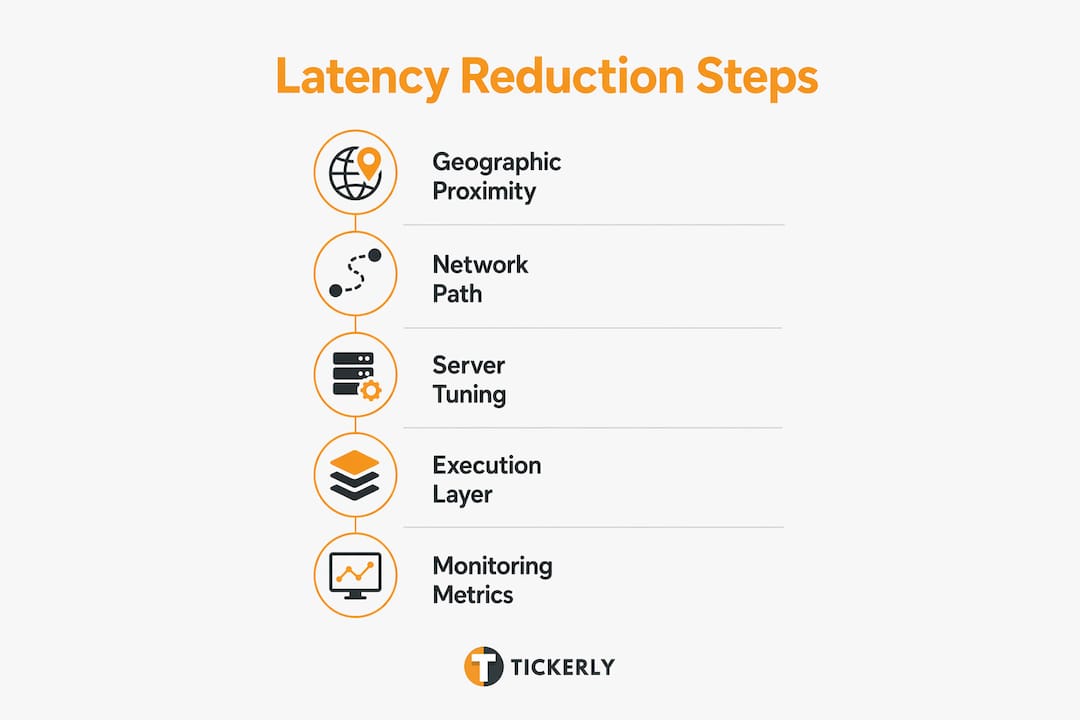
Reducing trading latency comes down to one principle: optimize in the right order. Start with where your server lives, then fix your network path, then tune your OS, and only then touch your code. Skipping ahead to micro-optimizations while your server sits in the wrong data center is the most expensive mistake in latency engineering. For retail traders automating TradingView strategies, the practical hierarchy looks like this:
- Geographic placement: Deploy your execution infrastructure in the same region and availability zone as your exchange. Regional placement is the single largest contributor to overall latency.
- Network path: Minimize hops, eliminate shared routing appliances, and use dedicated fiber or cross-connects where possible.
- Instance and hardware selection: Bare metal or network-optimized instances eliminate hypervisor jitter and noisy-neighbor interference.
- OS and kernel tuning: Disable power-saving CPU features, pin threads to cores, and configure IRQ affinity for deterministic execution.
- Code and scripting: Reduce dynamic allocations, use efficient data structures, and keep your Pine Script alert logic lean.
- Measurement: Track p50 and p99 latency histograms at every pipeline stage continuously, not just during setup.
- Automation tooling: Use a purpose-built execution layer like Tickerly to convert TradingView alerts into live orders with minimal delay.
Table of Contents
- How to reduce trading latency: the optimization hierarchy
- How to build a latency budget for your trading pipeline
- OS and hardware tuning for deterministic, jitter-free execution
- How Tickerly speeds up your TradingView strategy execution
- Tickerly turns your TradingView strategy into a faster, always-on trading bot
- Key Takeaways
- FAQ
How to reduce trading latency: the optimization hierarchy
The most common and costly mistake in latency work is optimizing in the wrong order. Latency engineers describe a five-tier hierarchy where geographic placement governs millisecond-range latency, while OS tuning operates in the microsecond range. No amount of cache-line alignment recovers the milliseconds lost by deploying in the wrong region.
Geographic proximity to your exchange’s matching engine is where you start. Running your trading platform on a VPS physically close to your broker’s servers can reduce latency from hundreds of milliseconds to single-digit milliseconds. A home internet connection might traverse 15–25 network hops before reaching a broker; a colocated VPS in the same data center might traverse as few as 2–5.
Network path comes next. Keep hot-path traffic point-to-point between instances. Avoid load balancers, NAT routers, and inspection appliances on the critical path. For inter-VPC traffic, use direct peering rather than transit gateways. Physical cross-connects within a data center eliminate unnecessary hops and give you direct exchange access.

Pro Tip: Don’t spend time tuning kernel parameters until you’ve confirmed your server is in the same availability zone as your exchange. A perfectly tuned kernel cannot compensate for a suboptimal region selection.
How to build a latency budget for your trading pipeline
A latency budget maps the full order lifecycle and assigns a time target to each stage. Without one, engineers chase ghost problems while the real bottleneck goes unaddressed.
Your pipeline has five measurable stages:
| Pipeline Stage | What It Covers | Typical Target |
|---|---|---|
| Market data ingestion | Wire receipt, parsing, normalization | — |
| Signal generation | Strategy logic, indicator computation | 5–50 µs |
| Risk validation | Pre-trade checks, position limits | — |
| Order transmission | Serialization, network send | 5–20 µs |
| Execution acknowledgment | Exchange response, fill processing | — |
Measure each stage independently using high-resolution timers. On Linux, rdtsc provides nanosecond-level precision without a system call. Aggregate your results into p50 and p99 histograms at every stage. A shift in p50 usually signals configuration drift; a shift in p99 points to jitter from a specific source like IRQ interference or NUMA boundary crossings.
For TradingView automation, your “signal generation” stage includes the time from alert trigger to webhook delivery. That leg is often the largest contributor for retail traders, which is why the execution layer connecting TradingView to your broker matters as much as the network path.
Monitoring best practices:
- Track p50, p95, p99, and p99.9 separately at each stage.
- Set automated alerts for deviations from your baseline.
- Benchmark under burst conditions, not just steady-state averages.
- Revisit budgets after any infrastructure change, kernel update, or strategy modification.
OS and hardware tuning for deterministic, jitter-free execution
Deterministic execution matters more than raw speed. A system that averages 15 µs but spikes to 500 µs during volatile sessions will cost you more than a system that runs a stable 25 µs. Disabling CPU frequency scaling, C-states, and EIST prevents the latency spikes that occur when the CPU transitions between power states during high-volatility periods.
Key OS and hardware tuning steps:
- CPU governor: Set to performance mode to lock clock speed and prevent frequency scaling.
- C-states: Disable via
intel_idle.max_cstate=0andprocessor.max_cstate=0in the kernel command line. - CPU core pinning: Use
isolcpus,nohz_full, andtasksetto dedicate cores to trading threads and keep the OS scheduler off them. - IRQ affinity: Pin network interrupt handlers to cores separate from your trading threads using static IRQ affinity scripts.
- NUMA awareness: Pin trading threads and their memory to the same NUMA node. Cross-NUMA reads can add 80–100 ns per cache line access, which compounds across every order encode.
- Memory pre-allocation: Allocate all memory at startup. Avoiding dynamic allocation on the hot path eliminates unpredictable OS-level latency spikes from
mallocandnewcalls. - Kernel bypass: DPDK polling mode can save roughly 20–45 µs per packet by eliminating the double-copy and kernel context switches that standard network stacks require.
- Huge pages: Enable at boot time before memory fragments; verify allocation in
/proc/meminfo.
For infrastructure performance at the system level, the goal is eliminating every source of non-determinism, not squeezing out the last nanosecond of average speed.
Pro Tip: Average latency metrics hide the outliers that actually cost you money. Always monitor tail latency at p99 and p99.9. Bare metal EC2 instances improve tail latency by 15–29% at p99.9 compared to virtualized instances, primarily by eliminating hypervisor scheduling jitter.
How Tickerly speeds up your TradingView strategy execution
For retail day traders, the execution layer between TradingView and your broker is where automation tools make a direct, measurable difference. Tickerly converts your TradingView Pine Script alerts into live orders across crypto, forex, and stock exchanges, removing the manual step that introduces the most variable latency in a retail setup.
Tickerly’s core advantages for execution speed:
- Real-time alert processing: Tickerly receives TradingView webhook alerts and routes them to your exchange immediately, minimizing the delay between signal and order placement.
- Multi-exchange connectivity: Manage strategies across multiple exchanges from a single interface without rebuilding execution logic for each venue.
- Emotion-free execution: Automated bots execute every signal at the same speed, regardless of market conditions. No hesitation, no missed entries.
- Multi-strategy management: Run several strategies simultaneously, which means your automated trading infrastructure stays active across different instruments and timeframes without added manual overhead.
- Continuous operation: Tickerly runs 24/7, capturing opportunities that occur outside trading hours or during periods when manual monitoring isn’t practical.
Users report significant improvements in efficiency and profitability after switching from manual execution to Tickerly’s automated bots. For long-term profitability in automated trading, consistent, low-latency execution across every signal matters as much as the strategy itself.
The combination of geographic placement, OS tuning, and a fast execution layer like Tickerly addresses latency at every stage of the pipeline. Each layer handles a different order-of-magnitude problem: your VPS location handles milliseconds, your OS tuning handles microseconds, and your execution tool handles the application-layer delay between alert and order.
Tickerly turns your TradingView strategy into a faster, always-on trading bot
Faster execution without the complexity of building your own infrastructure is exactly what Tickerly delivers. While the technical layers covered in this article apply to any automated trading setup, Tickerly handles the execution layer for you, connecting your TradingView alerts directly to your exchange with the speed and reliability that retail traders need.

Tickerly is built for day traders and active investors who want their Pine Script strategies running as live bots without writing custom API code or managing server infrastructure. You get real-time alert execution, multi-exchange support, and continuous automated trading across crypto, forex, and stocks. That means your strategy fires at signal speed, not at the speed of your reaction time. To see how it works in practice, visit the TradingView automation guide or go straight to automated trading on TradingView to get started.
Key Takeaways
Geographic placement is the single largest latency factor, and no amount of code tuning recovers the milliseconds lost by deploying your execution infrastructure in the wrong region or availability zone.
| Point | Details |
|---|---|
| Start with geography | Deploy in the same region and availability zone as your exchange before any other optimization. |
| Build a latency budget | Assign time targets to each pipeline stage to find real bottlenecks instead of guessing. |
| Tune OS for determinism | Disable C-states, pin CPU cores, and pre-allocate memory to eliminate jitter during volatile markets. |
| Monitor tail latency | Track p99 and p99.9 histograms continuously; bare metal instances improve p99.9 by 15–29%. |
| Use Tickerly for execution | Tickerly automates TradingView alerts into live orders across exchanges, cutting application-layer delay. |
FAQ
What is the fastest way to reduce trading latency?
The fastest single improvement is moving your trading platform to a VPS colocated in the same data center as your broker’s server, which can reduce latency from hundreds of milliseconds to single-digit milliseconds.
Why does tail latency matter more than average latency?
Average latency hides the outlier spikes that cause stale fills and missed queue priority. Monitoring p99 and p99.9 latency reveals the real performance under burst conditions.
How does Tickerly reduce latency for TradingView traders?
Tickerly processes TradingView webhook alerts and routes orders to your exchange in real time, removing the manual execution step that introduces the most variable delay in a retail trading setup.
What OS settings have the biggest impact on trading latency?
Disabling CPU frequency scaling and C-states, pinning trading threads to isolated cores, and pre-allocating memory at startup are the highest-impact OS changes for deterministic, jitter-free execution.
Do I need a dedicated server to minimize trading delays?
Not necessarily. A well-positioned VPS with dedicated CPU cores and NVMe storage, placed close to your broker’s servers, delivers the latency profile most retail traders need without the cost of bare metal colocation.