

For most active TradingView traders who need multi-asset execution across crypto, forex, and stocks, Tickerly is the strongest PineConnector alternative, thanks to cloud-native routing and multi-strategy support. If your entire workflow lives inside MT5 forex on a VPS, a focused bridge like AlgoWay or SignalForge may still fit better. PineConnector itself remains a reasonable choice only for that narrow MT4/MT5-only use case.
TL;DR:
Multi-asset trading platforms like Tickerly support routing TradingView alerts across crypto, forex, and stocks, unlike PineConnector, which is limited to MetaTrader with MT4/MT5.
Tickerly and AlgoWay offer low-cost, cloud-native solutions with testing demos to verify execution speed and fill rates before live trading, with Tickerly providing a no-code setup.
Brokers’ order type support and the ability to handle multiple accounts or strategies vary between platforms; confirm these features during testing to ensure compatibility with your trading style.
Support quality and data security practices differ; platforms with clear privacy policies, encrypted data transfer, and active user communities tend to be more reliable for live trading.
Strategy volume and asset class diversity influence the choice; high-frequency scalpers need robust, low-latency platforms, while swing traders can prioritize ease of setup and stability.
Table of Contents
Why Look Beyond PineConnector for TradingView Automation?
PineConnector built its reputation as a straightforward relay between TradingView Pine Script alerts and MetaTrader terminals. That’s still its strength, and independent comparisons confirm it stays best for traders who remain inside MT4/MT5 rather than branching into crypto exchanges or US stockbrokers.
The problem is that most active traders today don’t run a single-platform strategy. You might backtest on TradingView, execute forex through MT5, and also run a crypto strategy on a separate exchange. PineConnector was never built for that kind of multi-asset routing, which is exactly why traders search for pineconnector alternatives in the first place. Community threads on Reddit show this demand clearly, with traders regularly asking for replacements that can handle MT5 routing alongside crypto and stock execution without stitching together multiple tools.
The alternatives fall into two practical buckets. One group specializes in MT5/MT4 bridging, similar to PineConnector but sometimes cheaper or faster. The other group operates as cloud relays that connect TradingView directly to brokers and exchanges across asset classes. Knowing which bucket fits your trading style narrows the pineconnector alternatives comparison considerably before you even open a demo account.
Ten PineConnector Alternatives Worth Evaluating
Here’s a shortlist worth testing, starting with the option built specifically for multi-asset TradingView automation.
-
Tickerly — Converts TradingView alerts into live bots across crypto, forex, stocks, and futures, with multi-strategy handling and a free trial to test execution before committing.
-
TradersPost — A dashboard-first relay with broad US broker coverage; pricing tiers run higher, reported in a range from about fifty to three hundred dollars per month depending on volume, per comparison data from Ontology.
-
AlgoWay — Lower-cost multi-platform router starting near $6 per month, with a live MT5 demo flow for testing alerts end to end.
-
SignalForge — MT5-focused bridge with an active ForexFactory discussion thread covering routing reliability.
-
TradingConnector — Straightforward MT4/MT5 connector for traders who don’t need crypto or stock routing.
-
WunderTrading — Cloud automation built around crypto exchange integrations and a strategy marketplace.
-
AutoView — Script-based automation plugin for developers comfortable configuring alerts manually.
-
QuantConnect — Research-first platform combining backtesting with brokerage execution hooks.
-
Finestel — Smaller specialist connector surfaced in several roundup comparisons.
-
MyFXBook — Analytics-first tool with limited connector functionality via community add-ons.
How Do These PineConnector Alternatives Compare?
The right pick depends on which axis matters most to your strategy: broker breadth, price, or setup speed.
Three takeaways stand out. MT5-only traders sticking to forex or CFDs can reasonably stay with a focused bridge like AlgoWay or SignalForge. Multi-asset traders running crypto, stocks, and forex together get the most value from Tickerly’s unified routing. Low-cost hobbyists testing strategies before committing capital should prioritize AlgoWay’s live demo over platforms with no visible trial.
What Each Alternative Actually Offers
Tickerly connects directly to TradingView alerts and routes them into live execution across crypto, forex, and stock exchanges, with support for running multiple strategies at once. You can test the full flow through Tickerly’s TradingView automation guide before funding a live account.
Here’s what the rest of the field brings to the table:
-
TradersPost: broad broker list, dashboard-based order management, developer tooling visible on its GitHub organization.
-
AlgoWay: budget entry point with a working MT5 demo for pre-launch testing.
-
SignalForge: MT5 bridge with an active community thread tracking routing behavior.
-
TradingConnector: simple EA-style bridge for MT4/MT5-only setups.
-
WunderTrading: exchange-native crypto automation with a built-in strategy marketplace.
-
AutoView: script-level control for traders comfortable coding their own alert logic.
-
QuantConnect: backtesting environment with brokerage execution hooks for quants.
-
Finestel and MyFXBook: narrower, specialist tools better suited as supplements than full replacements.
How Should You Choose Between These Options?
Run through this checklist before signing up for any platform:
-
Does the vendor publish its full broker and exchange list, or do you have to ask?
-
What order types does it support: market, limit, stop, or all three?
-
Can it handle multiple accounts or strategies running simultaneously?
-
Is pricing tiered by asset class, alert volume, or a flat monthly rate?
-
Does the vendor offer a demo environment, or only a live-money trial?
During your trial period, ask support these five questions directly: What’s your average execution latency under load? Do you return broker order IDs for every fill? What happens if TradingView’s webhook drops a signal? Can I run crypto and forex strategies on the same account? What’s your uptime history over the last quarter?
Watch for red flags: no visible demo account, pricing that requires a sales call to disclose, a broker list that’s vague about which exchanges are actually live, and no confirmation of order IDs after execution.
Pro Tip: Check third-party review pages like Trustpilot before committing. Mixed sentiment on a connector’s review page often flags execution or support issues that vendor marketing won’t mention.
How to Test and Migrate From PineConnector Safely
Switching platforms mid-strategy is where most traders lose money, not from the new tool itself, but from skipped verification steps. Follow this sequence before moving live capital:
-
Open a demo account on the new platform and connect it to TradingView.
-
Configure your alert payload to match the platform’s required format.
-
Fire at least 20 to 30 test alerts across different symbols and order types.
-
Verify that MT4/MT5 ticket IDs or broker order IDs return for every single alert.
-
Log latency and fill rate for each trade, then compare against your PineConnector baseline.
Symbol mapping trips up more migrations than anything else. Broker symbol names rarely match TradingView tickers exactly (think “EURUSD” versus “EURUSD.raw”), and a mismatch here silently drops orders instead of throwing an obvious error. Order-type mismatches cause a similar problem: a platform that only supports market orders will misfire against a strategy built around limit entries.
VPS-based bridges like PineConnector require you to manage terminal uptime yourself. Cloud relays like Tickerly remove that maintenance layer entirely, which matters if you’ve ever lost a trade to a VPS restart at the wrong moment. Independent testing confirms execution speed and fill-rate differences are measurable across platforms, so don’t skip the logging step. You can walk through Tickerly’s own connection steps on the MT5 automation guide or the MetaTrader connection page while you build your test protocol.
Execution Latency and Reliability: What to Expect
Latency is where PineConnector alternatives separate themselves most clearly. Hands-on testing across four automation tools found measurable differences in latency and fill rates depending on whether the platform routes through a local VPS terminal or a cloud relay.

PineConnector has historically delivered sub-second MT5 routing for straightforward forex trades, but that speed depends entirely on your VPS configuration and TradingView’s webhook delivery time, both of which sit outside PineConnector’s control. Cloud-native platforms like Tickerly remove the VPS variable by handling execution server-side, which tends to produce more consistent latency across high-volume alert bursts.
Reliability isn’t just about speed. It’s about whether every alert actually produces a confirmed fill. A dropped webhook or a symbol mismatch can silently skip an order, and you won’t know unless you’re checking broker ticket IDs after every trade. This is why demo testing matters more than any published latency number: your specific strategy, symbol list, and alert frequency will behave differently than a generic benchmark.
If your strategy fires dozens of alerts per session across multiple assets, prioritize a platform built to handle concurrent execution without queuing delays. If you’re running one or two trades a day on a single MT5 pair, the latency difference between platforms becomes far less consequential, and setup simplicity should weigh more heavily in your decision.
User Interface and Ease of Use Compared to PineConnector
PineConnector’s interface is minimal by design: you configure a license key, map it to your EA, and manage most of the logic through Pine Script comments in your alert message. That’s fine for traders who already know Pine Script syntax, but it puts the burden of formatting entirely on you.
Tickerly takes a no-code approach instead, letting you configure strategies through a dashboard rather than hand-writing alert syntax for every parameter. That matters most for traders who want to run multiple strategies simultaneously without maintaining a separate alert template for each one.
TradersPost follows a similar dashboard philosophy, with visual strategy management that suits teams juggling several accounts. AlgoWay and SignalForge stay closer to PineConnector’s original model: functional, but leaning on manual configuration and community documentation rather than a polished setup flow. AutoView sits at the far end of that spectrum, requiring genuine scripting comfort to configure correctly.
If you value speed of setup over granular control, prioritize platforms with visual dashboards. If you’re already fluent in Pine Script and prefer full control over every alert parameter, a bridge-style tool that mirrors PineConnector’s manual approach might still feel more natural, even if it means more upfront configuration work.
Customer Support and Community Resources
Support quality varies more across these platforms than almost any other factor, and it’s usually invisible until you actually need help mid-trade.
PineConnector relies heavily on its own documentation and a smaller user community for troubleshooting. SignalForge has built visibility through an active ForexFactory thread, where users trade troubleshooting tips and report routing behavior in real time, a useful signal since forum activity often reveals problems faster than official support channels.
TradersPost backs its dashboard with developer-facing resources visible on its GitHub organization, which suits traders comfortable digging into technical documentation directly. AlgoWay pairs its live demo with support geared toward walking new users through initial setup. QuantConnect, given its research-platform roots, maintains an active developer community focused on backtesting and algorithm design rather than live-execution troubleshooting.
Tickerly’s support model centers on direct assistance through its automated trading FAQ and guided setup documentation, aimed at getting multi-asset strategies live without requiring a developer background.
Before committing to any platform, check whether support response happens through live chat, email ticketing, or forum-only self-service. A platform with no visible community presence and no published support channel is a genuine warning sign, especially if you’re running real capital on the connection.
Security Features and Data Privacy
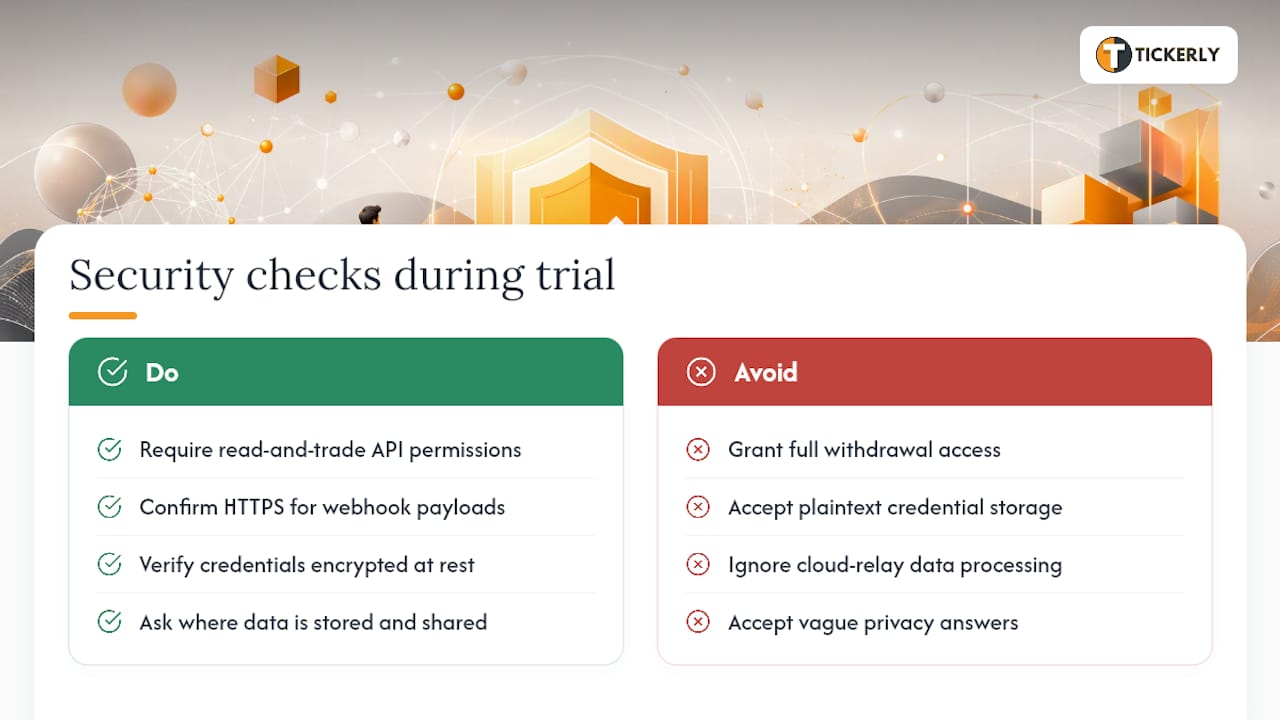
Every connector in this category needs API keys or account credentials to place trades on your behalf, which makes security architecture a legitimate evaluation criterion, not an afterthought.
Look for platforms that use read-and-trade-only API permissions rather than full withdrawal access. Reputable exchanges and brokers let you scope API keys narrowly, and any automation platform worth using will explicitly recommend you do so. If a platform’s setup instructions don’t mention permission scoping at all, that’s worth flagging during your trial.
Encryption in transit matters too. Webhook payloads traveling from TradingView to your execution platform should run over HTTPS, and credential storage on the platform’s end should be encrypted rather than stored in plain text. Most established platforms, including Tickerly, TradersPost, and QuantConnect, publish some form of data handling policy, though the depth of detail varies.
Data privacy becomes more relevant with cloud relays than with local EA bridges, since a cloud platform necessarily processes your alert data and, in some cases, your trading history through its own servers. PineConnector and TradingConnector, operating closer to a local-bridge model, keep more of that data flow on your own machine or VPS. That’s a genuine tradeoff worth weighing if you’re trading a strategy you consider proprietary.
Ask directly during your trial: where is data stored, is it encrypted at rest, and does the platform ever share execution data with third parties. A vendor that answers clearly and specifically is a better sign than one that points you to a generic privacy policy page.
Integration With Third-Party Tools and APIs
Most of these platforms exist specifically because TradingView’s native webhook system needs a translator to talk to brokers and exchanges, so API integration depth is the whole point.
TradersPost stands out here with developer tooling visible on its GitHub repositories, letting technically inclined traders extend or customize integrations beyond the standard dashboard options. QuantConnect goes further, offering a full research API for traders who want to build and backtest custom logic before connecting to live execution.
Tickerly integrates directly with TradingView alerts and connects outward to supported crypto, forex, and stock exchanges, with no-code setup for traders who don’t want to manage API authentication manually. AlgoWay and SignalForge focus more narrowly on MT4/MT5 API bridging, without the broader third-party ecosystem TradersPost or QuantConnect support.
If your workflow depends on connecting to a trading journal, a risk management tool, or a custom analytics dashboard alongside your execution platform, check whether the connector exposes its own API or webhook output for that purpose. Not every platform does, and this is a meaningful gap for traders running a more complex tech stack beyond simple alert-to-order routing.
Customization and Scripting Flexibility
Pine Script remains the common language across nearly every alternative on this list, since TradingView strategies are written in it regardless of which execution platform you connect to.
Where these platforms diverge is how much additional customization they allow beyond the alert message itself. AutoView leans hardest into scripting flexibility, letting experienced developers control execution logic at a granular level. QuantConnect takes a different but equally flexible approach, supporting custom algorithm development in Python and C# for traders who want backtesting and execution to share the same codebase.
Tickerly takes the opposite philosophy: no-code configuration for Pine Script developers and TradingView users who want their strategy logic to stay in Pine Script while the platform handles routing, execution, and multi-strategy management without additional scripting. TradersPost and WunderTrading sit somewhere in the middle, offering dashboard configuration with some room for custom webhook formatting when needed.
If your strategy needs conditional logic beyond what a TradingView alert message can express, a scripting-flexible option like AutoView or QuantConnect gives you that room. If you’d rather keep your strategy logic entirely in Pine Script and let the connector handle execution mechanics, a no-code platform saves considerable setup time without sacrificing strategy sophistication.
Compatibility With Languages and Trading Strategies
Pine Script alerts are the universal input across this entire category, but what happens after the alert fires depends heavily on the platform’s underlying architecture.
QuantConnect supports Python and C# for traders who want to build strategies outside Pine Script entirely, then route execution through its brokerage hooks. AutoView expects a working knowledge of its own scripting conventions layered on top of your Pine Script alerts. Most other platforms, including Tickerly, TradersPost, AlgoWay, and SignalForge, accept standard TradingView webhook alerts without requiring you to learn a second language.
Strategy compatibility matters just as much as language support. Scalping strategies firing dozens of alerts per hour need a platform built for high alert volume without queuing delays. Swing strategies firing a handful of alerts per week have much more flexibility in platform choice, since latency and throughput matter less. Multi-asset strategies, running crypto and forex simultaneously, need a platform that actually supports both asset classes natively rather than requiring two separate tools stitched together.
Before committing, map your specific strategy type against the platform’s stated strengths rather than assuming general compatibility. A platform built for MT5 forex bridging will technically accept a crypto scalping alert, but that doesn’t mean it’s the right tool for the job.
When Should You Actually Switch From PineConnector?
Switching makes sense the moment your strategy outgrows a single platform, and that moment is easier to spot than most traders expect. If you’re manually managing separate tools for crypto and forex execution, or watching a VPS restart interrupt a live trade, you’ve already outgrown PineConnector’s core design. Tickerly’s multi-asset, cloud-native routing solves that specific gap. For traders who genuinely never touch anything outside MT5 forex, though, switching mainly adds complexity without a matching payoff.
— Jay
Try Tickerly’s Multi-Asset Automation Free Before You Commit
Switching connectors shouldn’t mean gambling live capital on an untested setup. Tickerly gives you a 30-day trial to run real alerts, verify fills, and check latency across crypto, forex, and stock accounts before a single dollar moves on autopilot.

Unlike single-platform bridges that lock you into one broker type, Tickerly handles multiple strategies and asset classes from one dashboard, so you’re not maintaining separate tools for separate markets. Whether you’re running a Pine Script scalping strategy on crypto or a swing setup on MT5, the same no-code configuration applies across the board.
Walk through the full setup on the Tickerly TradingView automation guide, connect your first alert, and confirm your fills before you scale up.
Sources
-
PineConnector Alternative with Live MT5 Demo
-
PineConnector Alternative in 2026: Honest Comparison for TradingView Automation – Ontology
FAQ
Is There a Free Connector That Links TradingView to MT5?
Some platforms, including AlgoWay, offer low-cost entry tiers with a live MT5 demo rather than a fully free permanent plan; Tickerly offers a 30-day free trial to test MT5 and multi-asset routing before paying.
Is There Anything Better Than TradingView for Charting and Alerts?
TradingView remains the dominant charting and alerting platform most connectors are built around; the real question isn’t replacing TradingView, it’s choosing the right execution layer, like Tickerly, to act on its alerts.
What’s the Best Open-Source Alternative to TradingView?
There’s no single dominant open-source charting platform that matches TradingView’s alert ecosystem and broker integrations; most traders instead pair TradingView with a connector rather than replacing the charting layer itself.
Is MT5 Better Than TradingView?
MT5 and TradingView serve different jobs: TradingView excels at charting, scripting, and alerts, while MT5 handles order execution and broker connectivity, which is exactly why connectors bridging the two exist in the first place.
Recommended
This article was produced with Al assistance and reviewed for accuracy. It is provided for general information only and is not professional or financial advice.