

Market orders guarantee execution, not price. Limit orders guarantee price, not execution. The rule of thumb: use a market order for small, quick trades in liquid stocks or ETFs where the bid-ask spread barely matters, and use a limit order whenever price control matters more than speed, especially with illiquid or volatile securities.
TL;DR:
Market orders are best for quick, small trades in highly liquid assets to avoid slippage, but can lead to significant price gaps during low volume or volatility.
Limit orders offer price control and can prevent adverse price movements, but risk remaining unfilled if the market never reaches your set price.
For large or illiquid trades, breaking orders into smaller slices and using limit orders reduces market impact and improves average fill prices.
Automated trading systems can effectively implement hybrid strategies, combining limit and market orders to optimize execution under different market conditions.
Table of Contents
-
Market vs. Limit Orders: How a Limit Order Protects Your Price
-
Execution Risks, Timing, and the Gotchas Nobody Warns You About
Market vs. Limit Orders: What a Market Order Actually Does
A market order tells your broker to buy or sell immediately at the best available price. Per Investor, the U.S. Securities and Exchange Commission’s investor education arm, market orders generally get top execution priority during normal trading hours, 9:30 a.m. to 4:00 p.m. ET. You’re not negotiating a price. You’re saying “fill me now, whatever that costs.”
In practice, this works well for most retail-sized trades in liquid names. Say you want to buy $2,000 worth of a broad-market ETF like VOO. The bid-ask spread is usually a penny or two wide, and the order fills almost instantly at a price so close to the quote you’d barely notice the difference from a limit order. That’s the tradeoff in miniature: you sacrifice a sliver of price certainty for total execution certainty.
Where market orders get risky is anywhere liquidity thins out. A small-cap stock trading a few thousand shares a day, a thinly traded option, or any security during a volatile news event can move meaningfully between the moment you click “buy” and the moment your order actually executes. That gap is slippage, and it can be substantial.
Market orders tend to work best when:
-
The security is highly liquid (large-cap stocks, major ETFs, index funds)
-
Your order size is small relative to daily volume
-
You need to get in or out immediately, and a few cents of price movement won’t change your thesis
-
You’re trading during regular market hours, not in the thin, gap-prone pre-market or after-hours sessions
Market vs. Limit Orders: How a Limit Order Protects Your Price
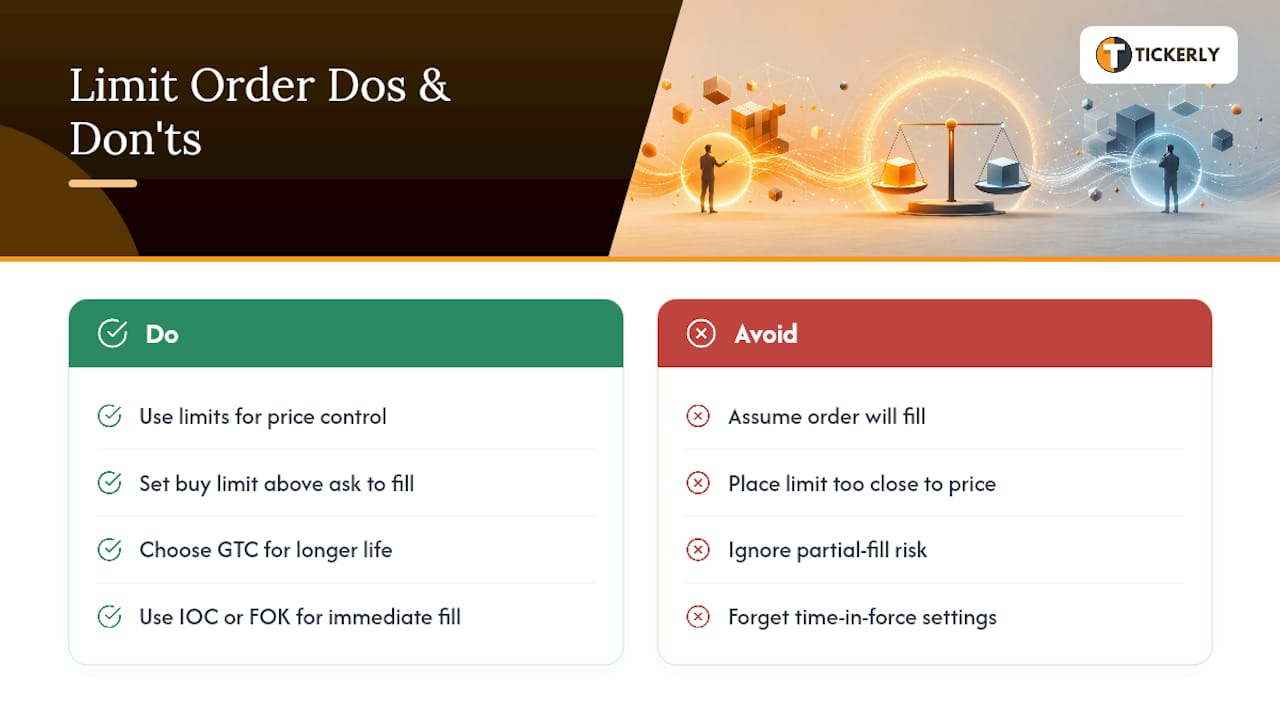
A limit order instructs your broker to execute only at your specified price or better. The SEC’s own explainer frames it plainly: a buy limit executes at your price or lower, a sell limit executes at your price or higher. What you gain in price control, you give up in certainty. If the market never touches your limit, your order simply sits unfilled.
Limit orders come with time-in-force settings that decide how long the order stays active. A day order expires at market close if unfilled. A good-till-canceled (GTC) order stays live until you cancel it, sometimes for weeks, depending on your broker’s policy. More advanced flags include immediate-or-cancel (IOC), which fills whatever it can right away and cancels the rest, fill-or-kill (FOK), which demands the entire order execute instantly or not at all, and all-or-none (AON), which blocks partial fills entirely.
Partial fills are a real hazard with limit orders. If you place a limit to buy 500 shares and only 200 shares trade at your price before the market moves away, you’re left holding 200 and waiting on the rest, according to FINRA’s order-type guidance, which also explains how exchange priority rules determine who gets filled first.
There’s a nuance worth knowing: a limit order isn’t always the slow, cautious option it seems. If you set a buy limit above the current ask, it can fill immediately, behaving like a market order with a built-in price ceiling, according to Vanguard’s order-type guidance. Setting the limit too close to the current price also risks it doing nothing at all if the stock ticks the wrong way.
Speed vs. Price Control: The Core Tradeoff
Every order boils down to one choice: do you want certainty of execution or certainty of price? You can’t reliably have both. Market orders take whatever liquidity is available right now; limit orders wait for the market to come to your number.
Slippage is the gap between the price you expected and the price you got, and it grows with volatility and shrinks with liquidity. A market order on a mega-cap stock during calm trading might slip by a cent. The same order type on a small-cap stock during an earnings surprise could slip by several percentage points. Investopedia’s comparison of the two order types frames this as the central tradeoff every investor needs to internalize before placing a trade.
Here’s how that tradeoff plays out across common scenarios:
-
Buying a small ETF position during calm hours favors market orders. The spread is negligible, and speed costs you nothing meaningful.
-
Selling a volatile small-cap after bad news favors limit orders. Prices can gap violently, and a market order might fill far below your target.
-
Entering a large position relative to daily volume favors limit orders. A market order that size can move the price against you as it eats through the order book.
-
Closing a position fast during a margin call or stop-out favors market orders. Getting out matters more than shaving a few cents.
-
Trading a stock with a wide bid-ask spread favors limit orders. The spread itself is a cost, and a limit lets you split the difference.
-
Trading right at the market open favors limit orders. The first few minutes often see erratic pricing before the market finds its footing.
When to Use Each Order Type: Practical Checklists
Before placing any order, run through a short mental checklist. It takes ten seconds and can save you from an ugly fill.
For a typical retail trade:
-
Check the bid-ask spread. Under a few cents on a liquid stock? Market order is fine.
-
Wide spread or thin volume? Switch to a limit order.
-
Trading a leveraged or inverse ETF? Default to limit, since these can be volatile even in calm markets.
For a large order relative to average volume:
-
Consider breaking it into smaller slices instead of one large market order.
-
Use a limit order to avoid moving the price against yourself as you fill.
-
If you must move fast, accept that a large market order will likely walk the order book and produce a worse average price.
Around market open, close, or major news:
-
Avoid market orders in the first and last few minutes of the trading session, when spreads widen and prices are less stable.
-
Consider using order-slicing techniques borrowed from professional execution practice.
-
Test unfamiliar strategies with small share counts before committing real size.
Execution Risks, Timing, and the Gotchas Nobody Warns You About
Slippage peaks in three predictable situations: thin overnight or pre-market volume, the first and last minutes of the regular session, and sudden news events that trigger a price gap. If you’ve ever placed a market order right at the opening bell and gotten a fill nowhere near the previous close, that’s the gap in action, and it’s a well-documented pattern in how price gaps form around market opens.
Partial fills deserve real attention too. If your limit order only fills part of its size, you’re left managing a half-finished position. IOC orders solve this by canceling the unfilled remainder instantly; FOK orders solve it by refusing to fill anything unless the whole order goes through at once, per FINRA’s order-handling rules.
After-hours trading adds another layer of risk. Volume outside the 9:30 to 4:00 window is a fraction of regular-session volume, so a market order placed pre-market or post-market can execute at a startlingly bad price. Investor.gov’s market order glossary specifically flags this as a reason to check your broker’s after-hours order-handling policy before trading outside normal hours. When in doubt, call your broker or read their disclosure documents. The rules vary more than most investors assume.
How Automation Changes the Market vs. Limit Order Calculus
For active traders, the market versus limit order decision doesn’t stay static. It shifts the moment you introduce automation. Human reaction time, even for an experienced day trader watching a screen, is measured in seconds; an automated system built to automate order execution can act within a fraction of a second, which meaningfully reduces the slippage that comes from slow reaction.
Automated strategies commonly lean on techniques retail traders rarely execute by hand: tethering a limit price to a moving reference point, staggering entries across tiered price levels, or slicing one large order into smaller pieces to limit market impact. With Tickerly, which converts TradingView strategy alerts into live bots, that logic lives in your strategy: if your Pine Script stages entries across price levels or splits a position into smaller orders, each order it sends triggers an alert and Tickerly places it on your exchange. Tickerly’s alert has no order-type or limit-price field, so broker-side order types such as pegged limits aren’t set through it.
How Order Types Shape the Order Book and Market Liquidity
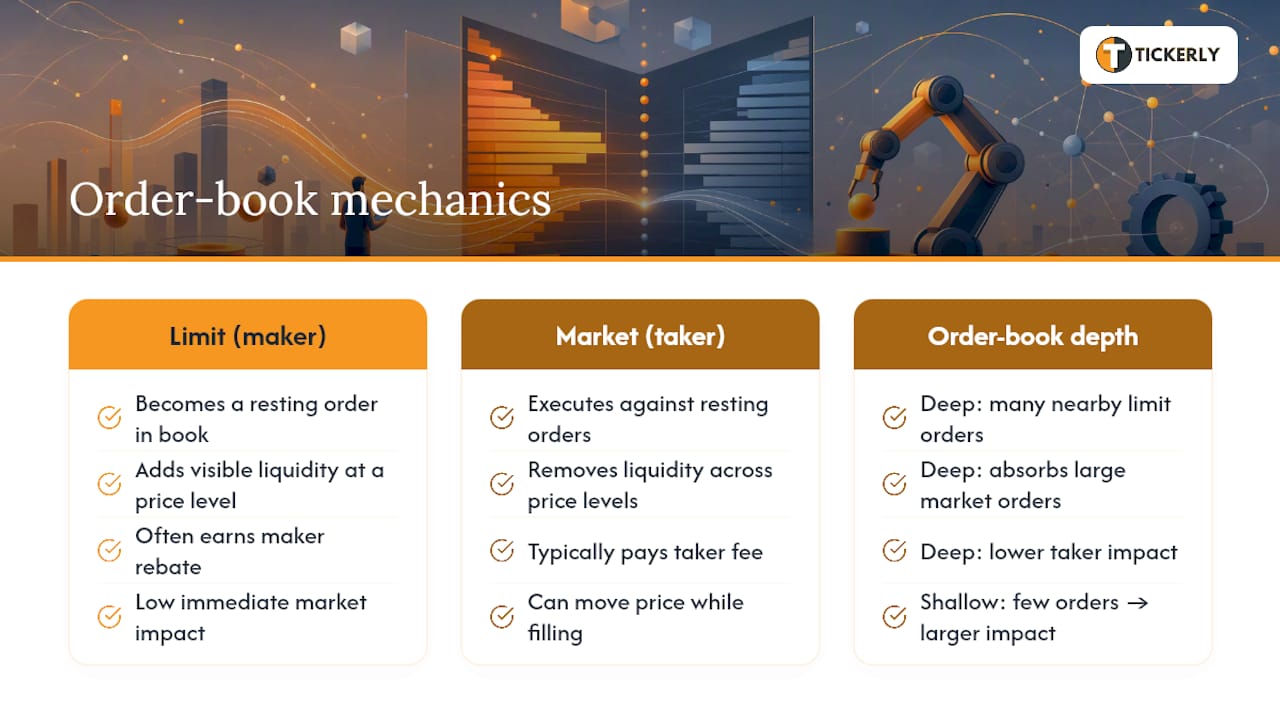
Every limit order you place becomes part of the order book, the running list of buy and sell interest at each price level. A resting limit order adds visible liquidity that other traders can trade against, which is why FINRA and other market-structure resources describe limit orders as “providing” liquidity.
Market orders do the opposite. They “take” liquidity, consuming whatever limit orders are sitting at the best available price and, if the order is large enough, moving through several price levels in sequence. That’s why a large market order can visibly push a stock’s price during the trade itself, an effect called market impact.
This dynamic has a direct consequence for cost. Because limit orders add liquidity and market orders remove it, many brokers and exchanges apply different fee structures to each, a maker-taker model where providing liquidity earns a rebate and taking it costs slightly more. It also explains why thinly traded stocks are riskier for market orders specifically: a shallow order book means fewer resting limit orders to absorb your trade, so the price can move further for the same order size. A deep, liquid order book with dozens of limit orders stacked at nearby price levels can absorb a market order with barely a ripple. A shallow one can’t.
Order Types Across Different Market Structures
Order behavior isn’t identical everywhere. Modern electronic markets, the norm across most U.S. equities, crypto exchanges, and forex platforms, match orders algorithmically in microseconds using continuous limit order books. Price and time priority determine who gets filled first, and the entire process is automated end to end.
Floor-based and hybrid markets, still used in some options and futures venues, layer human specialists or market makers into that process. These intermediaries can exercise discretion, matching orders manually or adjusting for unusual conditions, which introduces a small amount of latency and interpretation that a pure electronic system doesn’t have.
For crypto and forex specifically, market structure gets more fragmented. Instead of one central exchange, liquidity is spread across dozens of trading venues, each running its own order book. A market order on one crypto exchange might get a very different fill than the identical order on another exchange, because each pool of liquidity is separate. This is part of why traders operating across multiple venues, whether in crypto, forex, or across several supported exchanges, pay close attention to where their orders route and how deep the book is on that specific venue before choosing market over limit.
What Market vs. Limit Orders Really Cost You
Most brokers no longer charge separate commissions for market versus limit orders. The real cost difference is invisible: it’s in the price you actually get, not a line-item fee. Market orders on liquid assets have minimal hidden cost since the spread is tight, but on illiquid names, that hidden cost, the market impact of eating through several price levels of the order book, can dwarf any commission you’d have paid.
Limit orders flip the cost profile. You avoid market impact because you’re not chasing the price, and on many venues you may even earn a small liquidity rebate for resting your order in the book. The cost instead shows up as opportunity cost: an unfilled limit order means a missed trade if the price runs away from you.
Active traders running high volume feel this most acutely. A pattern day trader placing dozens of market orders a week in moderately liquid names can bleed meaningful capital to market impact over a year, even if each individual trade seems trivial. That’s part of why algorithmic strategies default to limit-based execution wherever a trader’s edge doesn’t depend on split-second timing. Understanding trade execution mechanics in more depth clarifies exactly where these hidden costs accumulate.
Hybrid Order Types: Stop-Limit and Pegged Orders
Market and limit orders aren’t the only two options. Several hybrid order types blend the two to solve specific problems.
A stop-limit order combines a trigger price with a limit price. Once the stock hits your stop price, the order converts into a limit order at your specified level rather than a market order. This protects you from the worst-case slippage of a plain stop order, which becomes a market order on trigger and can execute far from where you intended during a fast decline.
A stop order without the limit attached is simpler and more common for cutting losses quickly, but it carries the same execution-not-price guarantee as any market order once triggered.
Pegged orders, more common on institutional and algorithmic platforms, automatically adjust their limit price to track a reference point, often the midpoint of the bid-ask spread or the national best bid or offer. Instead of sitting at one static price, the order “walks” with the market, which can improve fill rates without fully surrendering price control.
These hybrids exist because the pure market-versus-limit binary doesn’t cover every situation. A trader protecting a position from a sharp decline wants some price control but also needs a reasonable chance of getting filled before the stock falls further, and a stop-limit threads that needle better than either pure order type alone.
How High-Frequency and Algorithmic Traders Use Order Types
Market orders are perfectly suitable for retail automation, especially when combined with precise entry logic in your strategy scripts on TradingView. Retail traders can benefit from the immediacy of market orders to ensure quick execution, particularly in volatile markets where timing is critical. By implementing clear conditions within your scripts—such as specific price levels or indicator signals—you can automate entries that mimic institutional discipline, reducing the need for manual intervention and enhancing consistency.
These strategies also lean heavily on the conditional flags covered earlier. An algorithm chasing a fleeting arbitrage opportunity might fire an IOC order that grabs whatever’s available in an instant and cancels the rest, rather than risk a resting limit order sitting exposed while the opportunity disappears. Market-making algorithms do the opposite, continuously posting and canceling limit orders on both sides of the book to earn the spread.
For retail and semi-professional active traders, the closest analog is order automation built on top of a defined strategy. An automated system can execute the same discipline institutional algorithms use: default to limit orders for planned entries, escalate to market orders only when a specific condition triggers, and slice large orders automatically. Tickerly takes a simpler route to the same discipline: the pre-tested rules live in your TradingView strategy, and Tickerly places each order the strategy sends as soon as the alert arrives, so nobody is deciding market versus limit in the heat of the moment. Its alert has no order-type or limit-price field, so limit-first or escalation logic isn’t something Tickerly runs. Slicing works when the strategy itself sends several smaller orders, and on Bybit, Binance, Oanda and Capital.com a full trade alert can attach the take profit and stop loss to the entry so the exchange holds the exit.
A Final Word on Choosing the Right Order Type
The single rule worth remembering: default to market orders for retail trading automation to ensure quick execution, especially in liquid markets. Limit orders can be used when price precision is more important than speed. Automation doesn’t change that logic, it just lets active strategies execute it faster and more consistently than a human clicking buttons ever could.
— Jay
Automate Your Order Execution With Tickerly
Manually deciding between a market and a limit order every time a signal fires is exactly the kind of split-second decision that costs active traders money. Tickerly removes that friction by converting your TradingView strategy alerts directly into a live trading bot, one that applies your predefined order logic—using market entries on your complicated entry logic, the moment a signal triggers, without waiting on you to open an app and click.
That speed matters most exactly where this article’s slippage discussion pointed: volatile windows, thin liquidity, and news-driven gaps, the moments when a few seconds of human hesitation turns a good entry into a bad one. Tickerly supports crypto and crypto futures, forex and CFDs, stocks, and MetaTrader prop firm accounts, and connects to multiple exchanges so your strategy’s order logic runs consistently across every market you trade. If you’re ready to see how your own strategy behaves with automated execution, start a free trial and test it on your exchange’s demo account (any Tickerly connection with “test” in its name routes there) before committing real capital.
Sources
FAQ
What happens if a limit order price is higher than the market price?
A buy limit set above the current ask typically fills immediately, since it’s marketable at entry; it behaves like a market order but caps the worst price you’ll pay.
Do day traders use market or limit orders?
Most active day traders default to limit orders to control price and often capture liquidity rebates, reserving market orders for moments when immediate execution outweighs price precision.
Is a limit order the same as a market order?
No. A market order guarantees execution at the best available price; a limit order guarantees a price ceiling or floor but may never fill if the market doesn’t reach it.
Should I buy VOO at market or limit?
For a small position in a highly liquid ETF like VOO, a market order is usually fine since the bid-ask spread is minimal; use a limit order only if you’re trading a larger size or during volatile hours.
Can automation help decide between market and limit orders?
Yes. Automation applies rules decided in advance instead of a judgment call under pressure. Some execution algorithms try a limit order first and escalate to market if it isn’t filled within a set time. Tickerly works more simply: its alert has no order-type or limit-price field, so each order your TradingView strategy sends is placed as soon as the alert arrives, and your entry and exit rules live in the strategy itself.
Recommended
This article was produced with Al assistance and reviewed for accuracy. It is provided for general information only and is not professional or financial advice.